
Close Menu
    Facebook X (Twitter) Instagram
    TRENDING :
    • What’s with those bobblehead NFL helmets?
    • South Walton High School Volleyball Season Preview
    • This quick test will tell you if your home Wi-Fi is to blame for laggy internet
    • NJ Tornado Threat: When Severe Storms Hit Today
    • The AI productivity paradox: Why AI is everywhere except in the productivity numbers
    • Who Has the Best High School Secondaries in the 804?
    • What happens when people have to jump in to clean up AI’s mess?
    • USD.AI (CHIP) Price Today: Live Market Cap and Chart
    Populist Bulletin
    • Home
    • US Politics
    • World Politics
    • Economy
    • Business
    • Headline News
    Populist Bulletin
    Home»Business»This quick test will tell you if your home Wi-Fi is to blame for laggy internet
    Business 4 Mins Read

    This quick test will tell you if your home Wi-Fi is to blame for laggy internet

    Business 4 Mins Read
    Share Facebook Twitter Pinterest LinkedIn Tumblr Telegram Email Copy Link
    Follow Us
    Google News Flipboard
    Share
    Facebook Twitter LinkedIn Pinterest Email


    If you suspect something’s amiss with your home network, the first thing you might do is run ​a speed test from sites like speedtest.net or fast.com​—or even the newer Orb speed test tool featured here last May​.

    But those tests don’t tell the whole story, because they only check the speed of your internet connection. They won’t tell you how quickly data can actually move around your home—which is important if you’re troubleshooting Wi-Fi problems or figuring out what internet speeds your router can handle. If you’re paying for gigabit internet, for instance, you’ll want to make sure your Wi-Fi network can keep up.

    To see what’s really going on with your Wi-Fi, consider using a tool that only tests the speed of your own local network and cuts the internet out of the equation entirely.

    That takes us to today’s Cool Tools treasure.

    This tip originally appeared in the free Cool Tools newsletter from The Intelligence. Get the next issue in your inbox and get ready to discover all sorts of awesome tech treasures!

    Time for your Wi-Fi checkup

    For a speed test that strictly works within your local network, use ​OpenSpeedTest’s self-hosted server​.

    ➜ OpenSpeedTest’s server software measures the connection speed between any two devices on your home network, independent of the external internet connection speeds.

    ⌚ It takes about five minutes to install the server app on one device and access the speed test on another.

    ☝️ To test the maximum speeds your router allows, you’ll need an ethernet cable and a computer with an ethernet port (or a high-speed USB-to-ethernet adapter like this one​).

    OpenSpeedTest isn’t like most typical internet speed testing tools.

    ✅ To get started, install OpenSpeedTest’s server software from the Microsoft Store​ for Windows, the Mac App Store​, or the Snap Store​ for Linux. ​Android​ and ​iPhone​ versions are also available, but again you’ll need an adapter to connect those devices to your router. Additional download links are available on OpenSpeedTest’s website​.

    Using an ethernet cable (and adapter if needed), connect the device you’re using to an open ethernet port on your router. If you use a wireless connection, speed test results will be slower than what your router can actually handle.
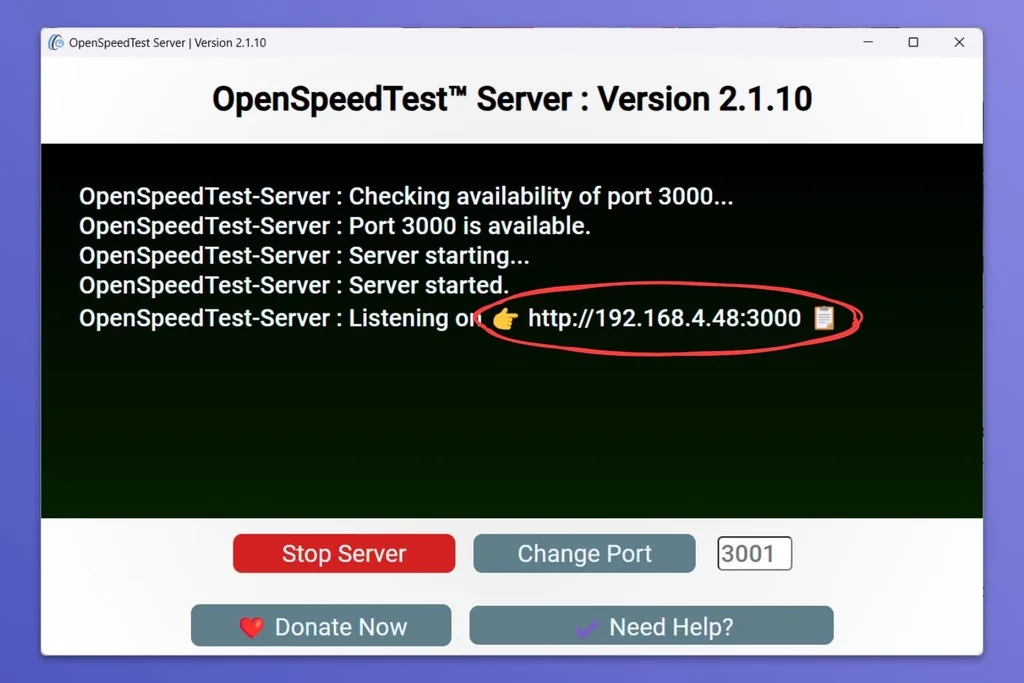
    The complete IP address lets you know OpenSpeedTest is working correctly.

    Launch the OpenSpeedTest Server application, and the server should start automatically. If not, hit the “Start Server” button. Look for the “Listening on” line and make note of the address (which should be a string of numbers starting with http://192.168…).

    Now, open a web browser on any other device and visit that address. You’ll see an “OpenSpeedTest” graphic if you’ve entered the address correctly.
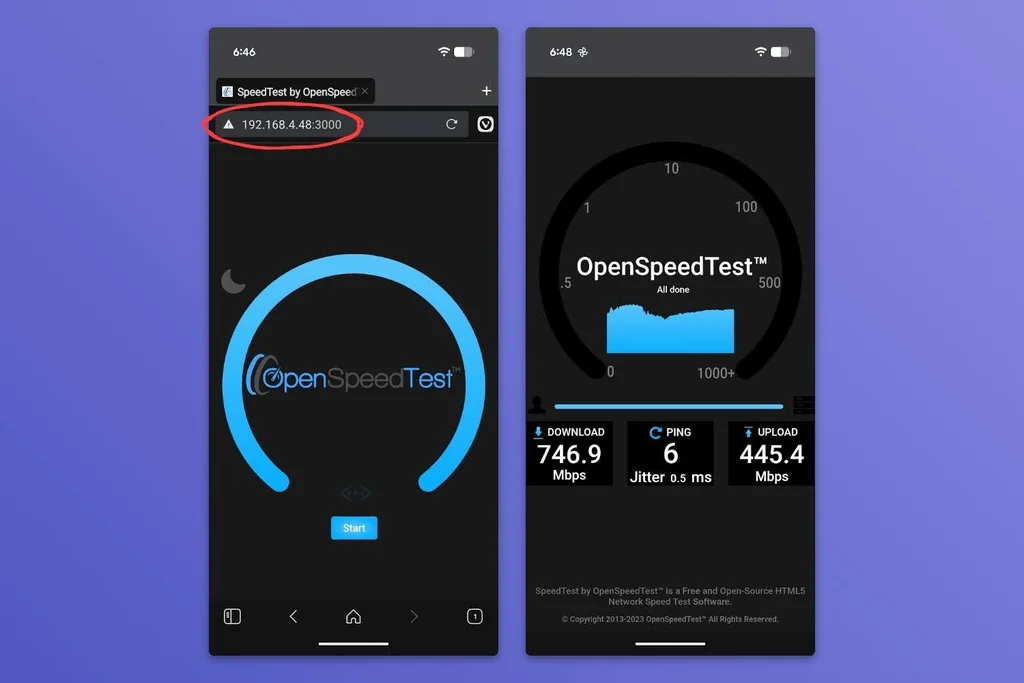
    OpenSpeedTest will show your IP address, then give you your results.

    Hit “Start” to run the speed test and allow about 30 seconds for it to finish. Reload the page to run additional tests. Try testing in different parts of your home—near your TVs, or in your bedroom, for instance—to see how the speeds differ.

    Don’t be surprised if the results are better than what you get from an internet speed test. With a solid Wi-Fi setup, data should be able to move around the home at least a little faster than what your home internet plan allows for.

    If the speed test results are notably slower than your home internet plan’s advertised speeds, you might be paying for more internet than you actually need. Either that, or you should consider a new router that can hit the speeds you should be getting.

    • OpenSpeedTest’s server software is available on Windows, Mac, Linux, iOS, and Android​, while the speed tests are accessible from any web browser.
    • The software is open source, free to use, and does not require any kind of registration. The direct download site has a couple of banner ads, but the actual tool does not.
    • OpenSpeedTest has a generic-looking privacy policy​ and says nothing about collecting internet usage data.

    Treat yourself to all sorts of brain-boosting goodies like this with the free Cool Tools newsletter—starting with an instant introduction to an incredible audio app that’ll tune up your days in truly delightful ways.


    Source link

    Share. Facebook Twitter Pinterest LinkedIn Tumblr Email

    Related Posts

    What’s with those bobblehead NFL helmets?

    October 18, 2026

    The AI productivity paradox: Why AI is everywhere except in the productivity numbers

    October 18, 2026

    What happens when people have to jump in to clean up AI’s mess?

    October 18, 2026
    Top News
    Business 8 Mins Read

    Why I Shut My Company Down for 2 Weeks Every Year

    Business 8 Mins Read

    Key Takeaways Britt Riley, founder and CEO of childcare company Haven, has created a network…

    Top 7 Productivity Tools for Businesses

    September 27, 2026

    Lompoc Football Defeats Dublin in Rivalry Matchup

    September 23, 2026

    The myth of the hero’s journey—and why it’s killing change in your organization

    June 2, 2026
    Top Trending
    Business 8 Mins Read

    What’s with those bobblehead NFL helmets?

    Business 8 Mins Read

    If you’ve been watching the NFL this season, you’ve probably noticed that…

    World Politics 1 Min Read

    South Walton High School Volleyball Season Preview

    World Politics 1 Min Read

    South Walton High School in Santa Rosa Beach, Florida, has its volleyball…

    Business 4 Mins Read

    This quick test will tell you if your home Wi-Fi is to blame for laggy internet

    Business 4 Mins Read

    If you suspect something’s amiss with your home network, the first thing…

    Categories
    • Business
    • Economy
    • Headline News
    • Top News
    • US Politics
    • World Politics
    About us

    The Populist Bulletin was founded with a fervent commitment to inform, inspire, empower and spark meaningful conversations about the economy, business, politics, government accountability, globalization, and the preservation of American cultural heritage.

    We are devoted to delivering straightforward, unfiltered, compelling, relatable stories that resonate with the majority of the American public, while boldly challenging false mainstream narratives that seem to only serve entrenched elitists, and foreign interests.

    Top Picks

    What’s with those bobblehead NFL helmets?

    October 18, 2026

    South Walton High School Volleyball Season Preview

    October 18, 2026

    This quick test will tell you if your home Wi-Fi is to blame for laggy internet

    October 18, 2026
    Categories
    • Business
    • Economy
    • Headline News
    • Top News
    • US Politics
    • World Politics
    Copyright © 2025 Populist Bulletin. All Rights Reserved.

    Type above and press Enter to search. Press Esc to cancel.