
Close Menu
    Facebook X (Twitter) Instagram
    TRENDING :
    • ‘No one knew I was in a different time zone’: The workers who travel, play tennis, and do chores on the clock
    • 5 ways to take breaks at work even when you’re time crunched
    • Digital Currency And The End Of Financial Privacy
    • Eldercare—the leadership crisis no one is talking about
    • Brazil Quietly Shifts Away From The Dollar To Gold
    • Why people can’t build wealth on wages alone, and what to do about it
    • A massive tariff refund program is launching. Here’s who actually gets the money
    • OpenAI shifts its focus to business users amid Anthropic pressure
    Populist Bulletin
    • Home
    • US Politics
    • World Politics
    • Economy
    • Business
    • Headline News
    Populist Bulletin
    Home»Business»This photo-tweaking time-saver is a perfect Google Photos power-up
    Business 4 Mins Read

    This photo-tweaking time-saver is a perfect Google Photos power-up

    Business 4 Mins Read
    Share Facebook Twitter Pinterest LinkedIn Tumblr Telegram Email Copy Link
    Follow Us
    Google News Flipboard
    Share
    Facebook Twitter LinkedIn Pinterest Email


    The way we edit images is in the midst of a massive reinvention right now.

    Adjustments that once required costly software and professional-level know-how are suddenly at our fingertips 24/7—with instant results and not even an ounce of skill required.

    And yet, for all the fantastic feats these fancy new AI image remixing genies of ours can accomplish, there are still times when a simple specialty tool can save the day and make your life instantly easier.

    Today’s Cool Tool is a perfect example. It’s an incredibly useful photo-editing resource that does one specific thing and does it insanely well.

    And—oh, yes—it’s completely free to use.

    This tip originally appeared in the free Cool Tools newsletter from The Intelligence. Get the next issue in your inbox and get ready to discover all sorts of awesome tech treasures!

    A bulk image editing powerhouse

    For full disclosure: The tool we’re about to talk about has been at the top of my mind lately because it’s one of the many advanced resources I share in my recently updated Android Photography Master Class​.

    But it isn’t relevant only for Android users. And it’s just too darn useful to keep behind closed gates and not share more broadly.

    ➜ The tool is called PhotoStack​, and it’s a web-based app that makes it entirely effortless to edit images in bulk—for instance:

    • Resizing a bunch of images to specific dimensions
    • Making an entire set of images sharper
    • Adding a specific sort of border or even watermark onto a lot of images at once
    • Or removing the data (including, at times, location info) that’s often baked into photos before you share ’em somewhere

    ✅ It couldn’t be much easier to use either.

    • You just open up the PhotoStack website​ . . .
    • Click or tap the “Edit images” button . . .
    • And then either click or tap the “Import” button or just drag and drop images directly onto the page.
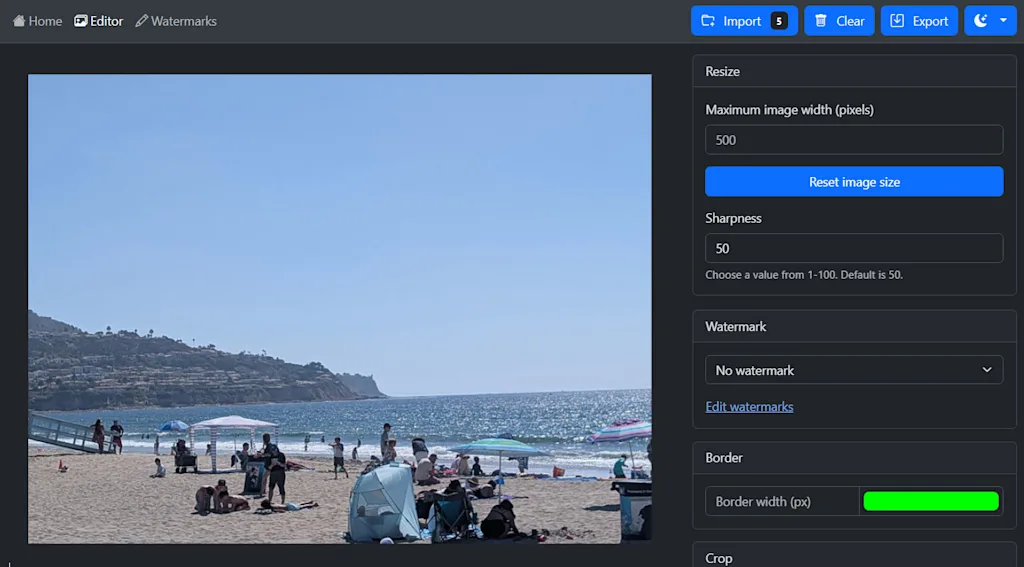
    Editing images in bulk is refreshingly easy with PhotoStack’s simple web tool.

    You can then use any of the options on the screen to adjust your images as needed, and any changes you make will be applied to all of the images at the same time.

    When you’re done, all that’s left is to click or tap the “Export” button, and all of your edited images will be saved back onto your device. Told ya it was easy, right?!

    PhotoStack is open source and completely free to use. And, critically, your images are never uploaded anywhere. All of the processing happens in your own browser, on your own device, without any privacy compromises.

    In a world filled with AI sorcery and the endless asterisks that accompany that, it’s a simple, supremely useful tool that’s well worth your while to hang onto for the right occasion.

    • PhotoStack is 100% web-based​—no downloads required. (Though you can install it as a progressive web app for easy ongoing access, if your browser offers that ability; look in your browser’s main menu when the site is open to see if the option is present.)
    • It’s free, with no limits or catches. You can opt to make a donation to support the developer if you like, but it’s never required.
    • And the app doesn’t collect or save any images, require any sort of sign-in, or ask for any manner of personal info. Its privacy policy​ is almost shockingly short and simple.

    Treat yourself to all sorts of brain-boosting goodies like this with the free Cool Tools newsletter—starting with an instant introduction to an incredible audio app that’ll tune up your days in truly delightful ways.


    Source link

    Share. Facebook Twitter Pinterest LinkedIn Tumblr Email

    Related Posts

    ‘No one knew I was in a different time zone’: The workers who travel, play tennis, and do chores on the clock

    April 17, 2026

    5 ways to take breaks at work even when you’re time crunched

    April 17, 2026

    Eldercare—the leadership crisis no one is talking about

    April 17, 2026
    Top News
    Business 5 Mins Read

    How This Refugee Became a Billion-Dollar CEO

    Business 5 Mins Read

    When Shirin Behzadi arrived in the United States from Iran at 17, she had no…

    Apple’s most important contribution over the past 50 years isn’t what you expect

    March 28, 2026

    Corporate Democrats Are Foolishly Surrendering the AI Fight

    December 12, 2025

    Cracker Barrel to Return to Its Old Logo

    August 27, 2025
    Top Trending
    Business 6 Mins Read

    ‘No one knew I was in a different time zone’: The workers who travel, play tennis, and do chores on the clock

    Business 6 Mins Read

    Errands, Target runs, tennis games, and even flying to Europe—these are just…

    Business 6 Mins Read

    5 ways to take breaks at work even when you’re time crunched

    Business 6 Mins Read

    Professional workdays are full, fast, and designed for productivity, not recovery. In…

    Economy 5 Mins Read

    Digital Currency And The End Of Financial Privacy

    Economy 5 Mins Read

    The push toward digital currency is being framed as innovation and efficiency,…

    Categories
    • Business
    • Economy
    • Headline News
    • Top News
    • US Politics
    • World Politics
    About us

    The Populist Bulletin was founded with a fervent commitment to inform, inspire, empower and spark meaningful conversations about the economy, business, politics, government accountability, globalization, and the preservation of American cultural heritage.

    We are devoted to delivering straightforward, unfiltered, compelling, relatable stories that resonate with the majority of the American public, while boldly challenging false mainstream narratives that seem to only serve entrenched elitists, and foreign interests.

    Top Picks

    ‘No one knew I was in a different time zone’: The workers who travel, play tennis, and do chores on the clock

    April 17, 2026

    5 ways to take breaks at work even when you’re time crunched

    April 17, 2026

    Digital Currency And The End Of Financial Privacy

    April 17, 2026
    Categories
    • Business
    • Economy
    • Headline News
    • Top News
    • US Politics
    • World Politics
    Copyright © 2025 Populist Bulletin. All Rights Reserved.

    Type above and press Enter to search. Press Esc to cancel.