

Close Menu
    Facebook X (Twitter) Instagram
    TRENDING :
    • This clever tool fixes the biggest blind spot of Google Photos
    • Jeremiah Fears Erupts for Season-High 24 Points in Loss
    • Elizabeth Holmes Ate Think Jerky, Changed the Business: ‘Wild’
    • Miami-Notre Dame, Utah-BYU Headline Week 10 Best Bets
    • Martin Armstrong On The Iran War And Why 2032 Is Closer Than You Think
    • Your Social Media Team Needs More Training — Not More Tasks
    • Ty Jerome Dishes Five Assists in 21-Point Night
    • This Violinist Became Snoop’s $10K-a-Month Ice Cream Taster
    Populist Bulletin
    • Home
    • US Politics
    • World Politics
    • Economy
    • Business
    • Headline News
    Populist Bulletin
    Home»Business»This clever tool fixes the biggest blind spot of Google Photos
    Business 5 Mins Read

    This clever tool fixes the biggest blind spot of Google Photos

    Business 5 Mins Read
    Share Facebook Twitter Pinterest LinkedIn Tumblr Telegram Email Copy Link
    Follow Us
    Google News Flipboard
    Share
    Facebook Twitter LinkedIn Pinterest Email


    What I’m about to tell you has a bit of a Matrix edge to it, I realize, but hear me out: Some of my favorite tools are the ones that fill in gaps and improve the experience in other apps I’m already using.

    We spend so much of our time in core areas like our email and our photos, after all—and most of us aren’t gonna make a major switch in which services we’re using for those things.

    So when a crafty tool comes along that can make something like Gmail or Google Photos even more fully featured and pleasant to use, that makes me metaphorically stand up and take notice.

    And that’s why I’m so excited to introduce you to today’s Cool Tools discovery. 

    This tip originally appeared in the free Cool Tools newsletter from The Intelligence. Get the next issue in your inbox and get ready to discover all sorts of awesome tech treasures!

    Photo processing, reinvented

    The tool I want to share with you today has an extra-rare distinction of (a) enhancing an app many of us already know and love, and (b) being a newly expanded version of something you may have actually heard about before.

    ➜ It’s called Batch​, and the reason it might sound familiar is that we talked about it in these very same Cool Tools quarters​ a few months back.

    At the time, the app had just launched with the simple sole purpose of letting you apply the same edits to a bunch of images in your Google Photos collection at once—in a way that’s incredibly practical and oddly impossible with Photos by itself.

    ☝️ This week, Batch is adding a bunch of extra features that make it an even more useful and indispensable Google Photos power-up.

    ⌚ They’ll take you a few minutes to explore and start using.

    Batch, in case you don’t recall, is a completely browser-extension-driven tool that adds extra features into Photos without ever accessing any of your data or uploading your images to any server. It works entirely in your own browser, on any computer you’re using, for complete privacy protection—and it looks and acts just like part of Photos itself, as added buttons and options within the standard Photos website​.

    Now, in addition to the bulk editing business, Batch can do a bunch of other gap-filling Photos feats—most notably using AI (again, only locally, on your own device) to look through an entire album of images, group similar shots, and then objectively rate the image quality and expressions of everyone pictured to help you find the best 25, 100, or however many you want from the bunch.

    Batch integrates seamlessly into the standard Google Photos website.

    You can use Batch’s “Pick for me” default approach, or customize the way it works to your own exact preferences. 
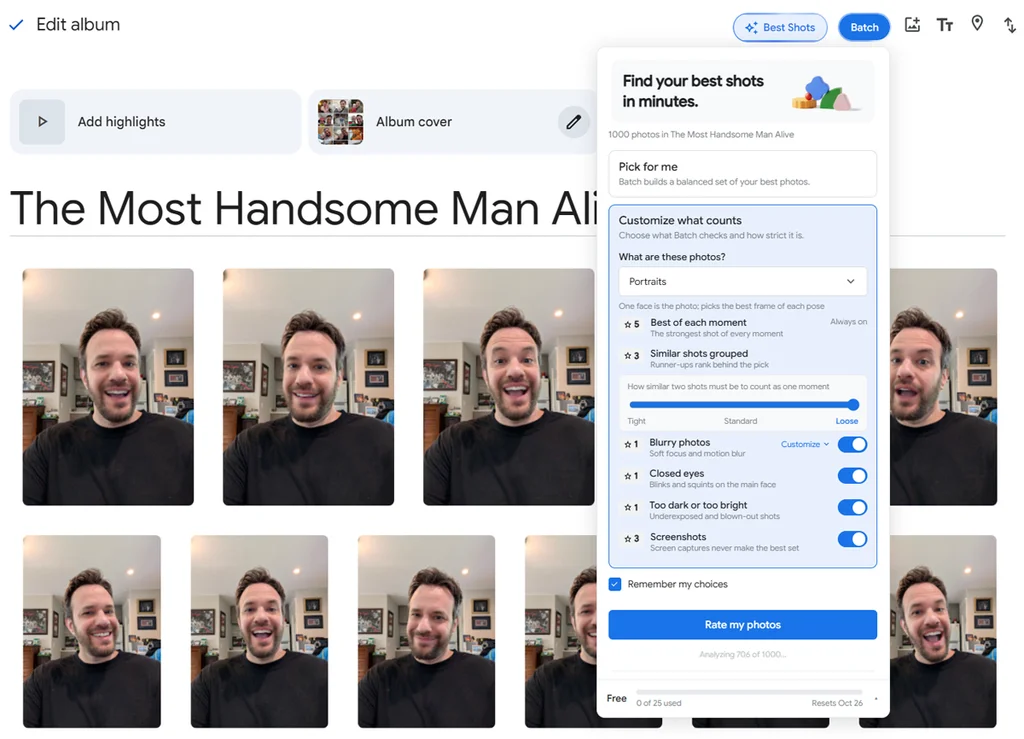
    Rely on Batch’s default settings, or create your own custom processing rules—your choice.

    From there, Batch shows you exactly which images it selected for you and why, and you can either accept its suggestions or fine-tune and adjust as you see fit. 

    You’ll see and confirm everything the tool is doing, at every step along the way.

    Then, it’s another couple of clicks to use Batch’s original Photos-integrated tools for enhancing all the images you’ve selected (or any other series of images in your collection) in the same simple way—something Photos itself has never made possible. 
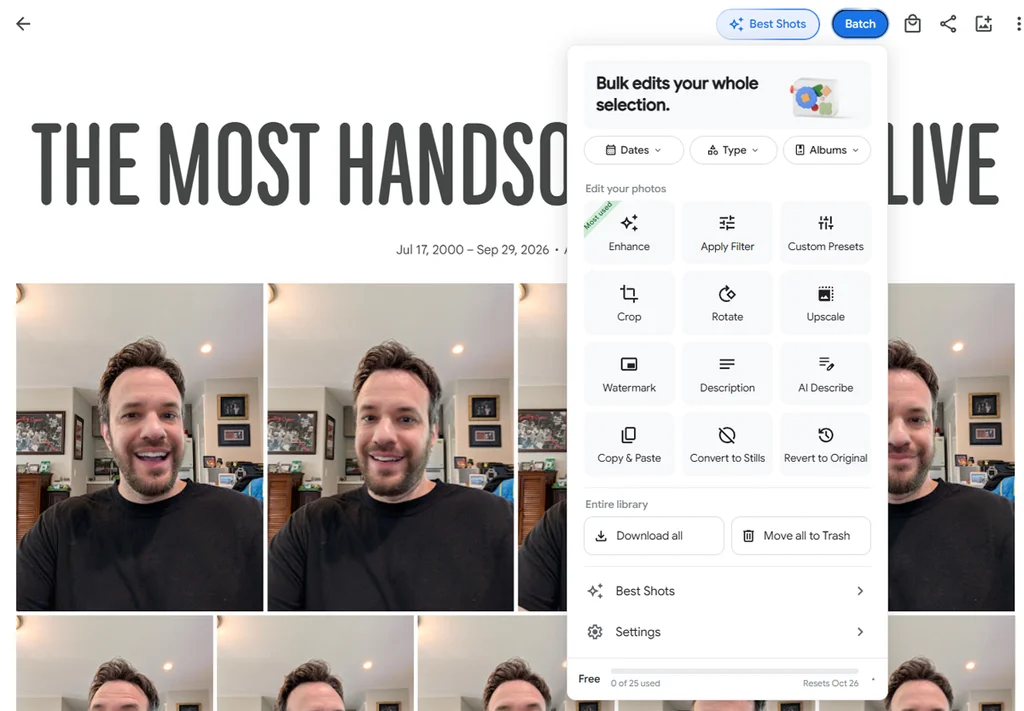
    At long last, simple bulk editing in Photos.

    You can even save the exact set of edits you like as a custom preset for future use, if you really want to get fancy. Everything Batch does is always easily undoable, too, in case you ever change your mind.

    Batch is free for up to 25 bulk edits per month. Its more advanced features, including the best shot selection, require a $7-per-month or $55-per-year “Plus” plan.

    If you take as many photos as I do and find yourself spending far too much time trying to go through ’em all, it might just be a Photos upgrade worth making. And even if you don’t make that leap, at its free level, there’s an awful lot to like and put to good use.

    • Batch works entirely in your browser​, within the Google Photos website, via its desktop Chrome extension​ (which can also be installed in any other Chromium-compatible browser).
    • It’s free to use on a limited level, with the full set of features requiring a $7 monthly or $55 annual plan.
    • The tool doesn’t store or see any of your photos or personal info, and everything it does happens locally on your own device.

    Treat yourself to all sorts of brain-boosting goodies like this with the free Cool Tools newsletter—starting with an instant introduction to an incredible audio app that’ll tune up your days in truly delightful ways.


    Source link

    Share. Facebook Twitter Pinterest LinkedIn Tumblr Email

    Related Posts

    Elizabeth Holmes Ate Think Jerky, Changed the Business: ‘Wild’

    November 7, 2026

    Your Social Media Team Needs More Training — Not More Tasks

    November 7, 2026

    This Violinist Became Snoop’s $10K-a-Month Ice Cream Taster

    November 7, 2026
    Top News
    US Politics 8 Mins Read

    The Saudi Phase of the Iran War Signals More Chaos to Come

    US Politics 8 Mins Read

    The conflict that Donald Trump has repeatedly proclaimed an unequivocal American victory keeps spiraling out…

    AI weather forecasting has reached a turning point that could prove valuable for farmers

    September 7, 2025

    Chase Bank is opening 160 branches in over 30 states, including in rural areas. Here’s where the new locations will be

    February 19, 2026

    NEW: Secret Service Arrest Man Who Scaled Treasury Building Fence Near White House | The Gateway Pundit

    September 30, 2025
    Top Trending
    Business 5 Mins Read

    This clever tool fixes the biggest blind spot of Google Photos

    Business 5 Mins Read

    What I’m about to tell you has a bit of a Matrix…

    World Politics 1 Min Read

    Jeremiah Fears Erupts for Season-High 24 Points in Loss

    World Politics 1 Min Read

    Jeremiah Fears put up a season-high 24 points, leading his team in…

    Business 6 Mins Read

    Elizabeth Holmes Ate Think Jerky, Changed the Business: ‘Wild’

    Business 6 Mins Read

    Key Takeaways Hirsch founded Think Jerky, a meat snack focused on chef-crafted…

    Categories
    • Business
    • Economy
    • Headline News
    • Top News
    • US Politics
    • World Politics
    About us

    The Populist Bulletin was founded with a fervent commitment to inform, inspire, empower and spark meaningful conversations about the economy, business, politics, government accountability, globalization, and the preservation of American cultural heritage.

    We are devoted to delivering straightforward, unfiltered, compelling, relatable stories that resonate with the majority of the American public, while boldly challenging false mainstream narratives that seem to only serve entrenched elitists, and foreign interests.

    Top Picks

    This clever tool fixes the biggest blind spot of Google Photos

    November 7, 2026

    Jeremiah Fears Erupts for Season-High 24 Points in Loss

    November 7, 2026

    Elizabeth Holmes Ate Think Jerky, Changed the Business: ‘Wild’

    November 7, 2026
    Categories
    • Business
    • Economy
    • Headline News
    • Top News
    • US Politics
    • World Politics
    Copyright © 2025 Populist Bulletin. All Rights Reserved.

    Type above and press Enter to search. Press Esc to cancel.