
Close Menu
    Facebook X (Twitter) Instagram
    TRENDING :
    • Stop your browser from killing your laptop battery with these 3 tweaks
    • Nikola Jokic Notches Monster Triple-Double for Nuggets
    • The White House Cannot Be The Gatekeeper Of Congressional Oversight
    • CFP Door Cracks Open for UTSA, Toledo and NDSU
    • The EU Has Adopted The Tactics Of Stalin – Fear Free Speech
    • Cousins Faces Mac Jones as Vikings Look Ahead to 2027
    • Best Employee Review Questions to Elevate Performance
    • Dallas Goedert Held to One Catch in Steelers Loss
    Populist Bulletin
    • Home
    • US Politics
    • World Politics
    • Economy
    • Business
    • Headline News
    Populist Bulletin
    Home»Business»Stop your browser from killing your laptop battery with these 3 tweaks
    Business 2 Mins Read

    Stop your browser from killing your laptop battery with these 3 tweaks

    Business 2 Mins Read
    Share Facebook Twitter Pinterest LinkedIn Tumblr Telegram Email Copy Link
    Follow Us
    Google News Flipboard
    Share
    Facebook Twitter LinkedIn Pinterest Email


    You unplug your laptop with a full charge, sit down at a coffee shop to get some work done, and an hour later your battery is already at 50%. You check your system settings to see what’s killing your power, and the culprit is exactly what you suspected: your web browser.

    Modern websites are effectively heavy software applications running constantly in the background. If you keep dozens of tabs open, your browser is caching media, running ad scripts, and refreshing data for every single one of them simultaneously. It eats up your system memory and forces your processor to work overtime.

    You don’t have to change the way you work or close your research tabs to get your battery life back. You just need to flip a few switches hidden in your browser’s settings menu.

    Turn on native memory savers

    Both Chrome and Edge finally have built-in tools to stop background tabs from draining power. In Chrome, go to Settings, click Performance and turn on Memory Saver and choose the Maximum option.

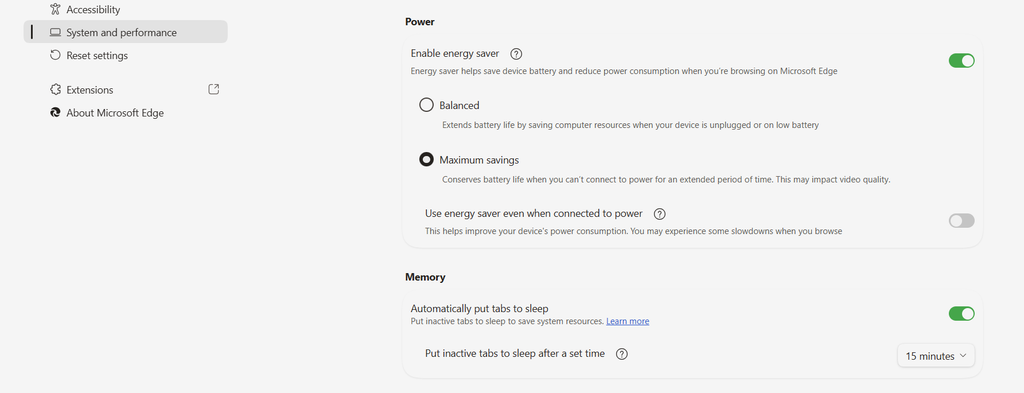
    In Edge, go to Settings, click System and Performance > Performance, and turn on Enable Energy Saver, then set it to Maximum Savings.

    Then toggle Automatically Put Tabs to Sleep on. This setting automatically puts inactive tabs to sleep until you click back to them.
    Stop background apps from running when closed

    By default, browsers like to keep their background processes running even after you’ve closed the browser window entirely. This is terrible for your battery.

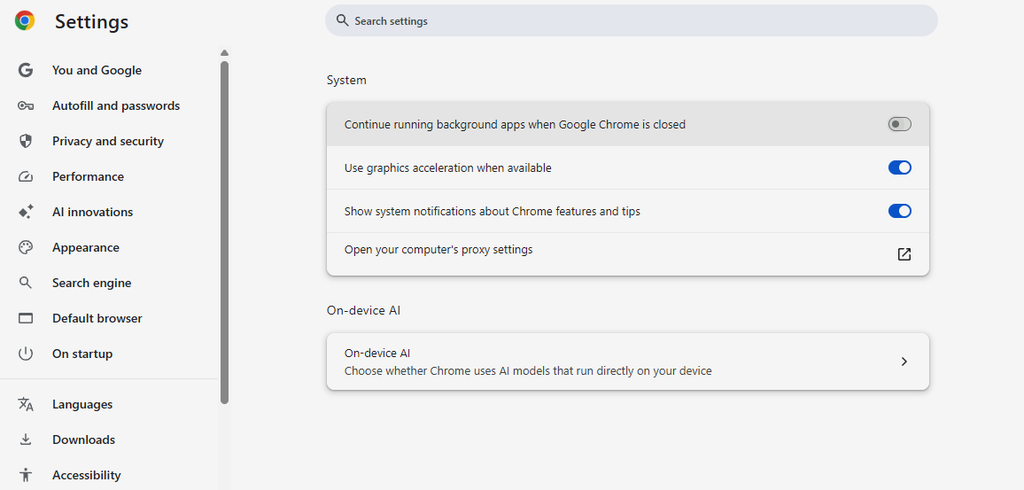
    Go to Chrome’s Settings, click System, and toggle off the switch that says “Continue running background apps when Google Chrome is closed.”

    In Edge, go to System and Performance > System and toggle off “Continue running background extensions and apps when Edge is closed.”
    Use a tab discarding extension

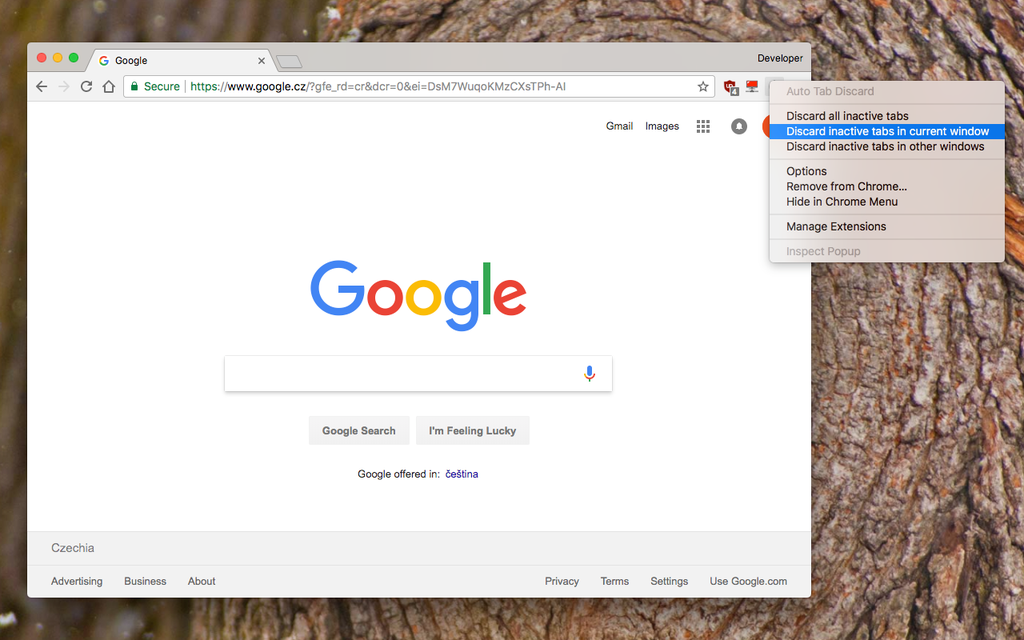
    If you’re someone who keeps fifty tabs open at all times, native memory savers might not be aggressive enough. Install a free extension such as Auto Tab Discard.

    It lets you set strict rules, like automatically unloading any tab you haven’t looked at in 10 minutes. The tab stays visible in your top bar, but it uses absolutely zero battery power until you click it again.


    Source link

    Share. Facebook Twitter Pinterest LinkedIn Tumblr Email

    Related Posts

    Best Employee Review Questions to Elevate Performance

    November 23, 2026

    7 Essential Maintenance Services Included for Your Home

    November 23, 2026

    What Is Agile Project Management and Why Does It Matter?

    November 23, 2026
    Top News
    Economy 2 Mins Read

    US Iran War – Here We Go Again

    Economy 2 Mins Read

    This is an important report discussing the real implications of this War which has always…

    What Are S Corp Taxes and How Do They Work?

    May 10, 2026

    Secretary of State Marco Rubio on the Hostages Being Held by Hamas – “Hamas has Accepted the Entire Construct of President Trump’s Proposal for Releasing the Hostages” (VIDEO) | The Gateway Pundit

    October 6, 2025

    Georgia Goes MAGA in the Republican Senate Primary

    June 17, 2026
    Top Trending
    Business 2 Mins Read

    Stop your browser from killing your laptop battery with these 3 tweaks

    Business 2 Mins Read

    You unplug your laptop with a full charge, sit down at a…

    World Politics 1 Min Read

    Nikola Jokic Notches Monster Triple-Double for Nuggets

    World Politics 1 Min Read

    Nikola Jokic posted a monster triple-double for the Denver Nuggets, once again…

    Economy 6 Mins Read

    The White House Cannot Be The Gatekeeper Of Congressional Oversight

    Economy 6 Mins Read

    The White House has issued a directive requiring federal agencies to obtain…

    Categories
    • Business
    • Economy
    • Headline News
    • Top News
    • US Politics
    • World Politics
    About us

    The Populist Bulletin was founded with a fervent commitment to inform, inspire, empower and spark meaningful conversations about the economy, business, politics, government accountability, globalization, and the preservation of American cultural heritage.

    We are devoted to delivering straightforward, unfiltered, compelling, relatable stories that resonate with the majority of the American public, while boldly challenging false mainstream narratives that seem to only serve entrenched elitists, and foreign interests.

    Top Picks

    Stop your browser from killing your laptop battery with these 3 tweaks

    November 23, 2026

    Nikola Jokic Notches Monster Triple-Double for Nuggets

    November 23, 2026

    The White House Cannot Be The Gatekeeper Of Congressional Oversight

    November 23, 2026
    Categories
    • Business
    • Economy
    • Headline News
    • Top News
    • US Politics
    • World Politics
    Copyright © 2025 Populist Bulletin. All Rights Reserved.

    Type above and press Enter to search. Press Esc to cancel.