
Close Menu
    Facebook X (Twitter) Instagram
    TRENDING :
    • How to put all your incoming messages in one unified dashboard (it’s easy!)
    • Disney Has Third Round of Layoffs, Hitting ESPN, Pixar, More * The Gateway Pundit * by Bryan Chai, The Western Journal
    • Japan Is The First Domino In The Sovereign Debt Crisis
    • Acting DNI Pulte Fires More Deep State Intel Officials * The Gateway Pundit * by Cristina Laila
    • Multiple People Shot at Bite of Seattle Food Festival – Shooter at Large * The Gateway Pundit * by Cristina Laila
    • As Islamists Slaughter Christians, Democrat Candidate Warns Christians Feel ‘Very Threatening’ to Her – She’s a Christian Minister * The Gateway Pundit * by C. Douglas Golden, The Western Journal
    • 7 Key Differences Between Limited Liability Companies and S Corps
    • Trump Honored with Major Highway in Morocco as Spain Watches Regional Balance Shift
    Populist Bulletin
    • Home
    • US Politics
    • World Politics
    • Economy
    • Business
    • Headline News
    Populist Bulletin
    Home»Business»How to put all your incoming messages in one unified dashboard (it’s easy!)
    Business 3 Mins Read

    How to put all your incoming messages in one unified dashboard (it’s easy!)

    Business 3 Mins Read
    Share Facebook Twitter Pinterest LinkedIn Tumblr Telegram Email Copy Link
    Follow Us
    Google News Flipboard
    Share
    Facebook Twitter LinkedIn Pinterest Email

    If your workday feels like a high-stakes game of notification whack-a-mole, you aren’t alone. Between Slack channels buzzing, Microsoft Teams pinging in the background, multiple email accounts open, and mobile messages cluttering your phone, simply checking if someone needs you takes up half your morning.

    You don’t need more communication tools! You need a single, unified dashboard that aggregates all those incoming messages into one central cockpit and then gives you complete control over when you actually see them.

    Here’s how to build one in about 20 minutes.

    The strategy: Use a catch-all app

    The cleanest, most reliable approach for most people is the aggregator app method. Rather than messing with complex webhooks or custom scripts, you wrap all your web-based messaging apps into a single desktop window with strict notification filters.

    Setting up your unified dashboard

    1.Prune your active channels

    Before pulling everything into one place, declare notification bankruptcy on channels you don’t actually need in real-time. Turn off “channel joined” alerts in Slack, mute low-priority Teams channels, and unsubscribe from non-essential email lists. If a channel doesn’t require direct action from you today, it shouldn’t be triggering real-time alerts.

    2.Choose and install a dedicated workspace app

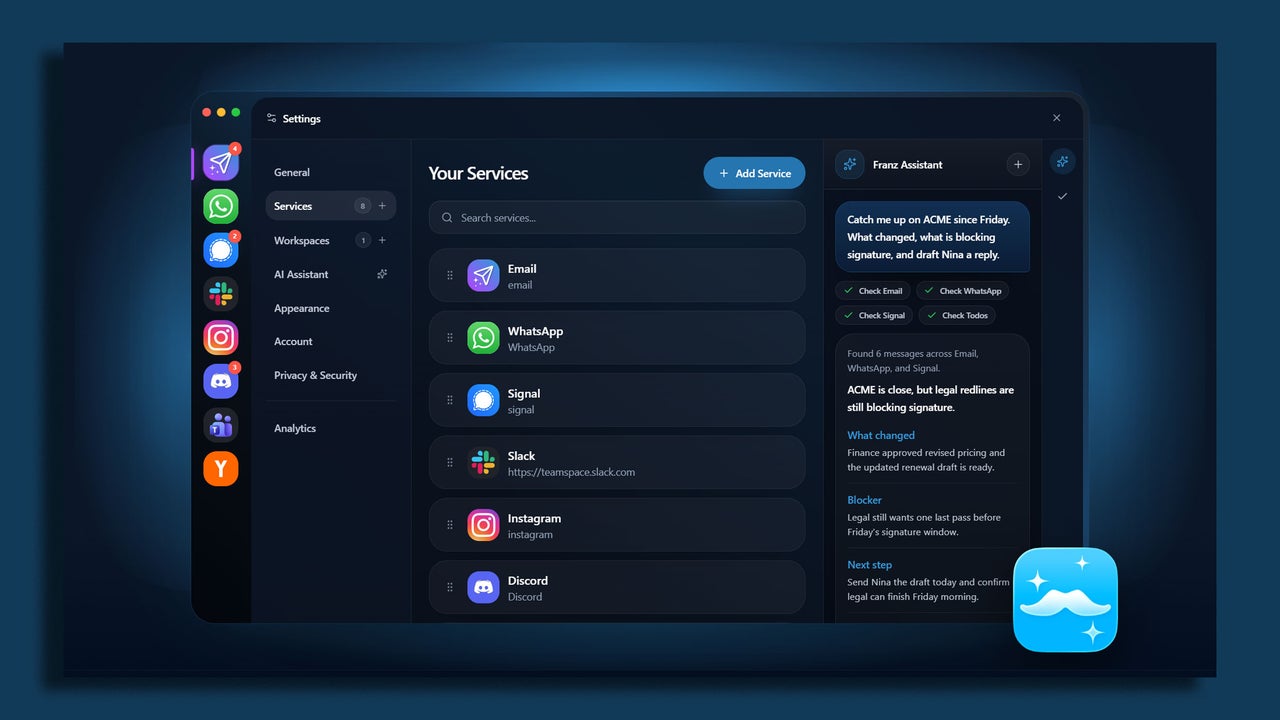
    Download a specialized workspace aggregator like Rambox, Franz, or Shift. All three have free versions with enough features to get you started.

    These apps let you run communication apps inside a standalone, organized window. Instead of keeping eight browser tabs open that hog system memory, you get one clean interface with dedicated app profiles.

    3.Consolidate SMS and mobile messaging

    If SMS or mobile-first apps like Signal and WhatsApp are part of your work day, pair them to your desktop setup. Mac users can leverage native Messages syncing, while Windows users can hook up Google Messages for Web or Phone Link. Add these web endpoints right into your workspace app alongside your work chat apps.

    4.Kill badge counts and set unified focus hours

    I know it sounds blasphemous, but turn off all red unread badge counters inside your aggregator app. Badges are designed to trigger panic!

    Instead, configure custom notification schedules within your workspace app so alerts only land during designated check-in windows (for example, at 10am and 3pm).

    Optional: Create a “VIP-only” emergency fail-safe

    The biggest fear people have when consolidating messages is missing a genuine emergency. The fix isn’t keeping every app open on a secondary monitor, it’s creating a dedicated emergency bypass.

    Set up a specific keyword alert in Slack and Teams (like your name or “URGENT”) to trigger sound alerts, while muting all general channel activity.

    For email, create a simple rule that pushes desktop pop-up notifications only if the message comes from your direct manager or key clients.


    Source link

    Share. Facebook Twitter Pinterest LinkedIn Tumblr Email

    Related Posts

    7 Key Differences Between Limited Liability Companies and S Corps

    July 27, 2026

    How Is Augmented Reality Changing Retail?

    July 27, 2026

    10 Essential Strategies for B2B Sales Growth

    July 26, 2026
    Top News
    Business 10 Mins Read

    7 Essential Tax Tips for Small Businesses

    Business 10 Mins Read

    Maneuvering through tax season can be challenging for small businesses, but grasping key strategies can…

    The Man Behind the Radical Walking Tours of New York City

    October 15, 2025

    Plumbing Subcontractor Forced to Shut Down and Lay Off 25 Union Workers After Being Owed Nearly $4 Million on Barack Obama Presidential Center * The Gateway Pundit * by Jim Hᴏft

    July 24, 2026

    What Creates a Successful B2B Sales Organization?

    June 28, 2026
    Top Trending
    Business 3 Mins Read

    How to put all your incoming messages in one unified dashboard (it’s easy!)

    Business 3 Mins Read

    If your workday feels like a high-stakes game of notification whack-a-mole, you…

    World Politics 3 Mins Read

    Disney Has Third Round of Layoffs, Hitting ESPN, Pixar, More * The Gateway Pundit * by Bryan Chai, The Western Journal

    World Politics 3 Mins Read

    Somebody should call the police to do a local wellness check on…

    Economy 7 Mins Read

    Japan Is The First Domino In The Sovereign Debt Crisis

    Economy 7 Mins Read

    Japan recorded a 1.01 trillion yen ($6.2 billion) trade deficit during the…

    Categories
    • Business
    • Economy
    • Headline News
    • Top News
    • US Politics
    • World Politics
    About us

    The Populist Bulletin was founded with a fervent commitment to inform, inspire, empower and spark meaningful conversations about the economy, business, politics, government accountability, globalization, and the preservation of American cultural heritage.

    We are devoted to delivering straightforward, unfiltered, compelling, relatable stories that resonate with the majority of the American public, while boldly challenging false mainstream narratives that seem to only serve entrenched elitists, and foreign interests.

    Top Picks

    How to put all your incoming messages in one unified dashboard (it’s easy!)

    July 27, 2026

    Disney Has Third Round of Layoffs, Hitting ESPN, Pixar, More * The Gateway Pundit * by Bryan Chai, The Western Journal

    July 27, 2026

    Japan Is The First Domino In The Sovereign Debt Crisis

    July 27, 2026
    Categories
    • Business
    • Economy
    • Headline News
    • Top News
    • US Politics
    • World Politics
    Copyright © 2025 Populist Bulletin. All Rights Reserved.

    Type above and press Enter to search. Press Esc to cancel.