
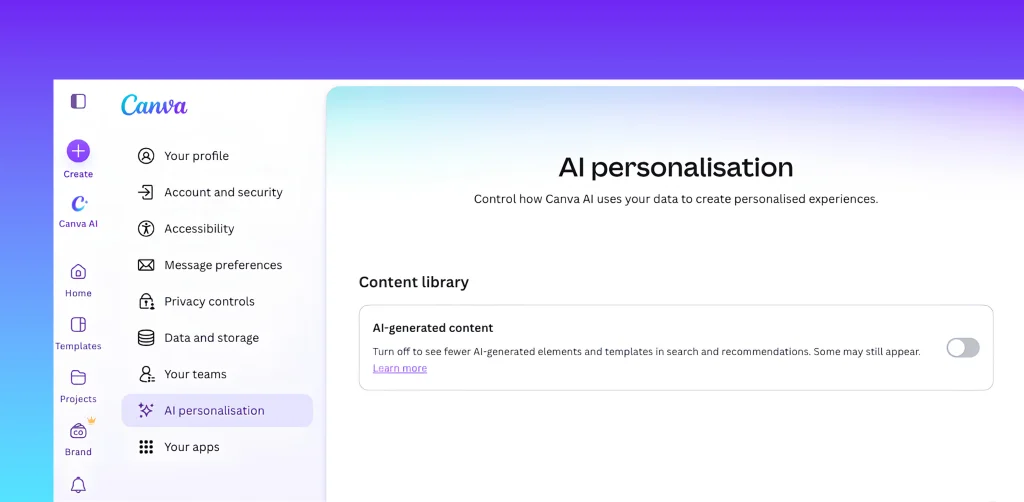
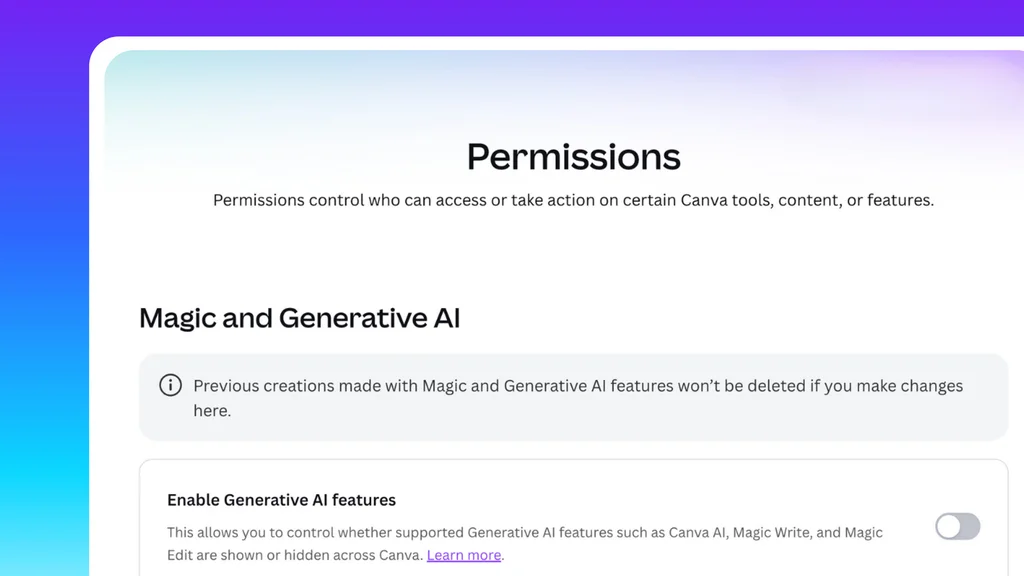
Over the last few years, Canva, the Australian design platform, has been stuffing generative AI into its products. Now, it’s giving you the option to make those AI features disappear. On Thursday, the company announced two new switches to rein in its AI for anyone on Canva Free and Canva Pro. One toggle button hides its generative AI features. Another one will make Canva show less AI-generated material in its library of templates and graphics.
The first button seems like pure theater to me. If a user doesn’t want to use AI tools, it’s easy enough to figure out how: Don’t press the sparkly AI button. The second one is more useful, however, since it can help users avoid being drowned by AI-generated material while browsing the Canva libraries that made this suite popular in the first place. It’s worth noting that the switch doesn’t ban all AI-generated material from view—it just shows less.
Both switches are buried in two settings menus. The general AI “kill switch” lives under Profile > Settings > Permissions. Flip it off, and Canva’s generative features are “hidden across Canva,” the company said in an announcement. These include Magic Expand, which extends a photo, and Canva Craft, the first generative image model developed by the company. You can turn them back on whenever you like.
Still, Canva hasn’t erased every AI thingamajig. The suite’s AI-based Background Remover and Magic Grab—which picks an object out of a picture to move it somewhere else in the design—are “assistive editing tools,” and therefore are still accessed after toggling AI off.
The second control sits under Profile > Your Account > AI Personalization (more on this later). Turn it on, and Canva cuts back the AI-generated material that pops up in search results and recommendations, pushing more human-made stuff to the top. The company says its AI content is only “a small portion” of its library, like abstract backgrounds and illustrated graphics.
Why, really
The filter matters to people who don’t want to wade through a river full of generative AI creations. It also benefits the humans behind the designs. Canva pays actual humans each time someone uses their work in a design. In theory, that steers money toward the designers and illustrators who fill the Canva library.
These features are essentially a temperature check on AI. Canva tied the launch to the public mood, citing Pew Research Center figures: Roughly 6 in 10 Americans say they want more control over how artificial intelligence is used in their lives. “We believe the future of creativity should be defined by choice, not dictated by technology,” the company said in a statement.
In an email, Canva says it is “always listening to our community and looking for ways to make Canva work better for them. We’ve heard that people want more choice over AI, and these controls are one way we’re responding. . . . These controls give people more choice over how AI fits into their Canva experience.”
But if Canva really wanted to make this happen, why bury the controls? If you want to empower your users and creators, there’s no reason to hide the settings. Rather, you should add the switches right there on the main interface so that people can choose their experience with ease. The company says that putting clearly visible AI kill switches right on the main interface, for every user to see right away, is something they are “actually exploring.”
Perhaps Canva fears that too many people will choose to deactivate these features, cutting off one of its revenue streams. After all, in the same announcement, Canva said that its community has used its AI tools more than 38 billion times. The company also says it’s still investing to make its AI wares “even more powerful.” And remember: Canva just built its own generative image model to help shave the costs of so many people using its AI tools. AI is still very much a priority for the company.
Canva claims that “this isn’t a marketing play” and that it is just a temporary solution: “Our goal was to get a solution live to our community as quickly as possible, but that doesn’t mean this is its final form. While it’s early, the response is telling us that people are excited to have this option, but we’ll listen for signals on how it should evolve.”