
You opened three tabs for a project right when you got to your desk, then opened five more while muted in your first meeting, followed by 14 Reddit articles you’ll definitely read later.
Add these to the hundred other tabs you left open yesterday, and by midafternoon your computer fan sounds like a jet taking off.
Modern web pages aren’t simple static documents anymore. Every open tab is effectively a mini-application running JavaScript, auto-refreshing ad scripts, and caching heavy media into your computer’s RAM.
The good news is you don’t have to throw away your open research to get your performance back. Here’s how to deal with tab hoard overload using built-in settings, smart extensions, and modern workspace tools.
Native fix: Built-in memory saver settings
Before installing a single extension, make sure your browser’s built-in memory management features are turned on. Google Chrome and Microsoft Edge both include native background tab suspenders designed to reclaim RAM automatically.
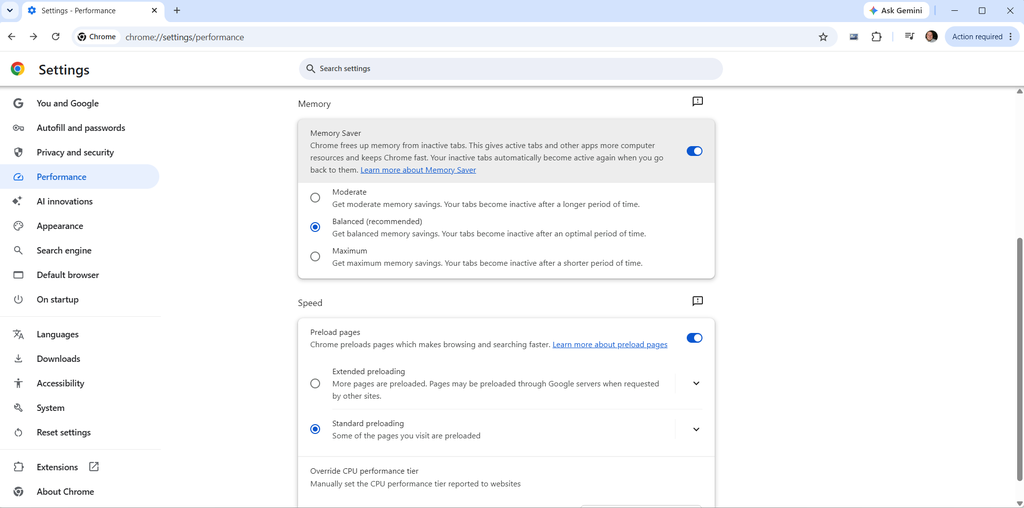
Google Chrome (Memory Saver): Go to Settings > Performance and ensure Memory Saver is toggled on. Chrome will automatically freeze inactive tabs after a period of nonuse, freeing up memory while keeping the tab visible in your bar. When you click back to a frozen tab, it reloads seamlessly.
Microsoft Edge (Sleeping Tabs): Go to Settings > System and Performance > Performance and toggle on Automatically Put Tabs to Sleep. You can set a custom inactivity timer ranging from 30 seconds to 12 hours before an idle tab goes to sleep.
Firefox: This browser also has built-in memory management and tab unloading, but it operates under a different philosophy from Chrome or Edge. Instead of putting tabs to sleep on a strict user-defined timer, it monitors system RAM pressure. When your computer starts running low on memory, Firefox automatically steps in and unloads background tabs you haven’t used recently, while protecting active media playback, live streams, and pinned tabs.
Proactive control: Auto Tab Discard
If a native browser memory saver feels too much like an unpredictable black box, Auto Tab Discard (available for Chrome, Edge, Firefox, and Opera) is worth a look.

While built-in memory-saving features react only when your computer’s RAM is already screaming for help, Auto Tab Discard lets you set exact, proactive rules, like freezing tabs after precisely 15 minutes of nonuse, or kicking in only when you cross a threshold of 10 open tabs.
It checks for unsaved text inside form fields before discarding, preventing accidental data loss. It also pauses rules if you drop Wi-Fi signal so you aren’t greeted by offline error pages.
This extension also preserves your exact scroll position and page state, so clicking back into a suspended tab feels like picking up right where you left off.
Heavy-duty purge: OneTab
If your browser bar is so crowded that you can no longer read tab titles or click on individual pages without accidentally hitting the tiny close button, native memory savers won’t fix the visual clutter.

OneTab is a free extension that works on just about any browser and, with a single click on the OneTab icon, instantly converts all your open tabs into a clean, organized list on a single web page.
Every tab process is fully terminated except for one lightweight list page, which frees up an exponential amount of RAM if you’ve got a ton of tabs.
You can restore tabs individually when you need them, restore the entire group with one click, or name and lock specific tab lists for ongoing projects.
Vertical tabs
If tab overload is a sickness you’re not exactly intent on curing, the traditional horizontal tab bar itself may be the problem.
Luckily, most modern browsers sport vertical tab layouts and some even offer segregated workspaces.
Click each browser’s name to learn how to enable vertical tabs: Chrome, Edge, and Firefox.
Stacking tabs vertically down the left side of your screen allows you to read full page titles regardless of whether you have 10 tabs or 90 tabs open.
Pair vertical tabs with built-in memory saving features or even one of the extensions listed above, and you can have your cake and eat it, too.