
Close Menu
    Facebook X (Twitter) Instagram
    TRENDING :
    • I Helped Build 150 Careers. Here’s What I Got Wrong About Talent
    • Skyline Spartans Football Video Highlights
    • J. Edgar Hoover- Quest For Honest Government
    • 4 Lessons I Learned From 8 Years of Backing Women Founders
    • High School Football Player Dies After Head Injury
    • Chile Is Back In The Streets
    • The 4 Questions That Helped Me Stop Making Blind Decisions as a Founder
    • Design Industry Tackles Key Challenges at Seminar
    Populist Bulletin
    • Home
    • US Politics
    • World Politics
    • Economy
    • Business
    • Headline News
    Populist Bulletin
    Home»Business»Google Chrome just dropped 3 new time-saving features
    Business 3 Mins Read

    Google Chrome just dropped 3 new time-saving features

    Business 3 Mins Read
    Share Facebook Twitter Pinterest LinkedIn Tumblr Telegram Email Copy Link
    Follow Us
    Google News Flipboard
    Share
    Facebook Twitter LinkedIn Pinterest Email


    Let’s be honest: The web browser is the modern-day operating system for everything from managing spreadsheets to pretending to work while reading tech blogs.

    Google knows this. That’s why the Chrome team announced a trio of new productivity features designed for people who basically live inside their browsers. Best of all? They’re actually quite useful.

    Here’s what you need to know to get your tab-hoarding, PDF-losing life back in order.

    Split View

    You know the drill. You’re trying to reference a document while writing an email, or maybe you’re watching a tutorial while trying to write code. You end up clicking back and forth between two tabs until your eyes cross.

    Enter Split View. It does exactly what it says on the tin: It lets you view two tabs side-by-side in a single window. No more dragging and resizing windows manually like it’s 2004.

    The feature is built into Chrome now, creating a single, organized workspace that keeps you focused.

    Unfortunately, it’s not super obvious. To enable it, you’ll need to open a new tab, then right-click said tab, and select “Add tab to new split view.”

    You’ll then have to select which of your open tabs to add to the other split-view pane. It takes about three or four more clicks than it should, but there you have it.

    PDF Annotations

    File this one under “Finally!”

    The Chrome PDF Viewer has always been a handy way to look at documents, but looking was about all you could do. If you needed to highlight a line or add a quick note, you had to download the file, open a dedicated PDF application, make the change, save it, and probably upload it again.

    Exhausting.
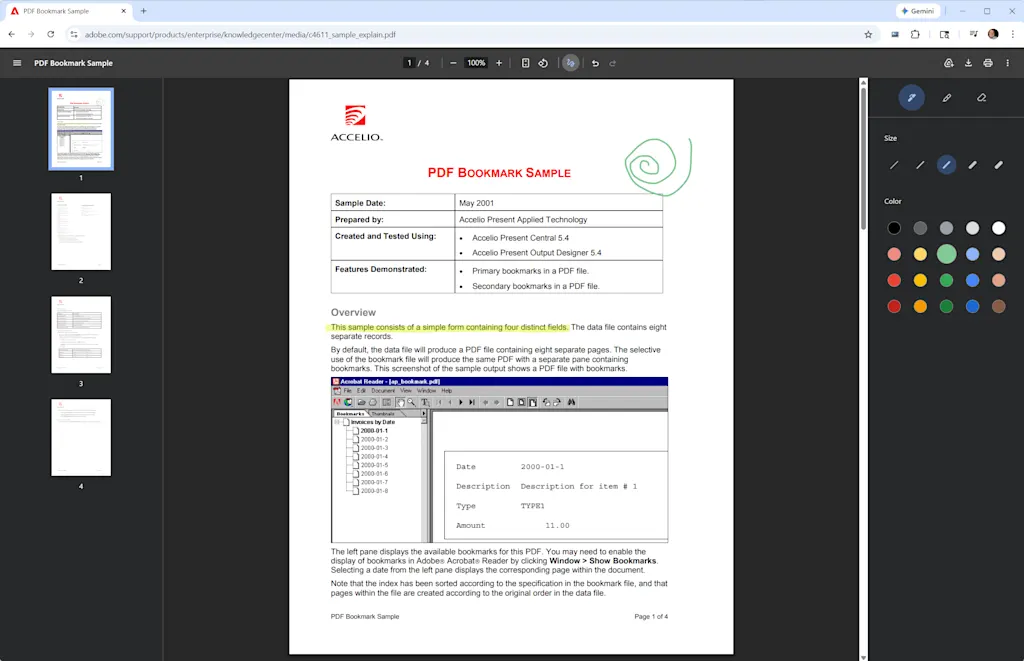
    Now you can highlight text and add handwritten notes to PDFs directly inside the browser by clicking the little squiggle icon at the top of any open PDF.

    This stuff isn’t as robust as Microsoft Edge’s PDF features, which let you enter typed text into form fields as well. But it’s still a tiny friction remover that’s going to save an unreasonable amount of annoyance.

    Save to Drive

    If your Downloads folder looks like a digital landfill of files named “Invoice_Final_V4(1).pdf,” you’re not alone. You download an important file, completely lose track of where your computer put it, and spend 10 minutes searching your hard drive.
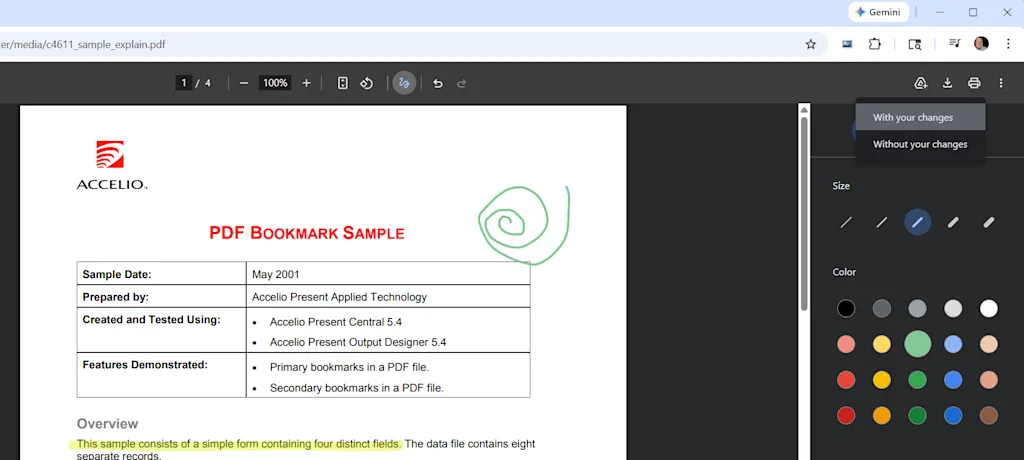
    To fix this, Chrome has added a direct “Save to Google Drive” feature. When you’re looking at a PDF, you can bypass the local download entirely by clicking the Google Drive icon in the upper-right corner.

    Chrome will whisk the file away to a dedicated “Saved from Chrome” folder right in your Google Drive. It’s instantly backed up, organized, easily searchable, and available on whatever device you decide to pick up next.


    Source link

    Share. Facebook Twitter Pinterest LinkedIn Tumblr Email

    Related Posts

    I Helped Build 150 Careers. Here’s What I Got Wrong About Talent

    October 6, 2026

    4 Lessons I Learned From 8 Years of Backing Women Founders

    October 6, 2026

    The 4 Questions That Helped Me Stop Making Blind Decisions as a Founder

    October 6, 2026
    Top News
    US Politics 9 Mins Read

    The Man Behind the Radical Walking Tours of New York City

    US Politics 9 Mins Read

    Society / October 15, 2025 Asad Dandia sued the NYPD after it spied on his…

    As Morale Sags, More Military Service Members Are Having a Crisis of Conscience

    September 22, 2026

    41 popular hair extensions have toxic chemicals linked to cancer and other health risks

    February 13, 2026

    Trump’s Threats to Free Speech Aren’t New to Black Journalists

    February 20, 2026
    Top Trending
    Business 7 Mins Read

    I Helped Build 150 Careers. Here’s What I Got Wrong About Talent

    Business 7 Mins Read

    Opinions expressed by Entrepreneur contributors are their own. Key Takeaways Strong performance…

    World Politics 1 Min Read

    Skyline Spartans Football Video Highlights

    World Politics 1 Min Read

    MaxPreps features video content showcasing the Skyline Spartans football program from Sammamish,…

    Economy 4 Mins Read

    J. Edgar Hoover- Quest For Honest Government

    Economy 4 Mins Read

    QUESTION: I just watched Genius on Albert Einstein. Beyond the fact that…

    Categories
    • Business
    • Economy
    • Headline News
    • Top News
    • US Politics
    • World Politics
    About us

    The Populist Bulletin was founded with a fervent commitment to inform, inspire, empower and spark meaningful conversations about the economy, business, politics, government accountability, globalization, and the preservation of American cultural heritage.

    We are devoted to delivering straightforward, unfiltered, compelling, relatable stories that resonate with the majority of the American public, while boldly challenging false mainstream narratives that seem to only serve entrenched elitists, and foreign interests.

    Top Picks

    I Helped Build 150 Careers. Here’s What I Got Wrong About Talent

    October 6, 2026

    Skyline Spartans Football Video Highlights

    October 6, 2026

    J. Edgar Hoover- Quest For Honest Government

    October 6, 2026
    Categories
    • Business
    • Economy
    • Headline News
    • Top News
    • US Politics
    • World Politics
    Copyright © 2025 Populist Bulletin. All Rights Reserved.

    Type above and press Enter to search. Press Esc to cancel.