
Close Menu
    Facebook X (Twitter) Instagram
    TRENDING :
    • What Is Online Reputation Management and Why Does It Matter?
    • Waltham Faces Chelsea in JV Football Showdown
    • Transform Chrome’s new tab page into the ultimate bookmark launchpad
    • Truffle Pig Named 2026 HOSPYS Finalist
    • Why the Latest AI Model Isn’t Always the Best Business Decision
    • Fox’s Canceled Sci-Fi Hit Became a Cult Classic
    • Alabama Coach Wins Court Battle, Clears Way for Rivalry Game
    • Merz Refuses To Relinguish Power In Germany?
    Populist Bulletin
    • Home
    • US Politics
    • World Politics
    • Economy
    • Business
    • Headline News
    Populist Bulletin
    Home»Business»Transform Chrome’s new tab page into the ultimate bookmark launchpad
    Business 4 Mins Read

    Transform Chrome’s new tab page into the ultimate bookmark launchpad

    Business 4 Mins Read
    Share Facebook Twitter Pinterest LinkedIn Tumblr Telegram Email Copy Link
    Follow Us
    Google News Flipboard
    Share
    Facebook Twitter LinkedIn Pinterest Email


    Whenever I install a new web browser, one of the first things I do is replace the new tab page.

    Depending on which browser you use, the default home page could be cluttered with news headlines, promotional tiles, or a messy list of recently visited sites. Typically, though, I already know which page I want to visit, and everything else becomes a distraction.

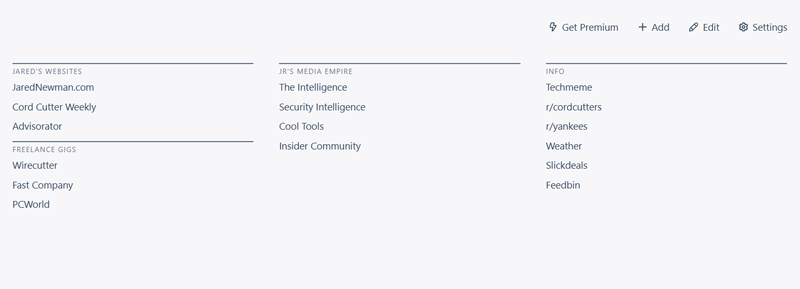
    So instead of sticking with the default, I use an alternative that focuses entirely on bookmarks, presenting dozens of links in the tidiest way possible.

    This tip originally appeared in the free Cool Tools newsletter from The Intelligence. Get the next issue in your inbox and get ready to discover all sorts of awesome tech treasures!

    Nothing but ’net links

    For a better new tab page full of your favorite bookmarks, check out A Fine Start.

    ➜ A Fine Start is a web browser extension that replaces your default new tab page with a simple, organized list of links.

    ⌚ Installing the extension takes just a minute. Setting up your links takes a few minutes longer.

    ✅ A Fine Start’s extension works in almost any desktop web browser. There’s also a non-installable web page version, which you can set as your homepage in Safari and some mobile browsers.

    A Fine Start is simple and minimalist—and it works almost anywhere.

    After installing the extension, use the “Add” button at the top to start adding links to the page. Give each link a name, and consider adding it to a “Group,” which creates a bit of visual separation between different kinds of bookmarks.
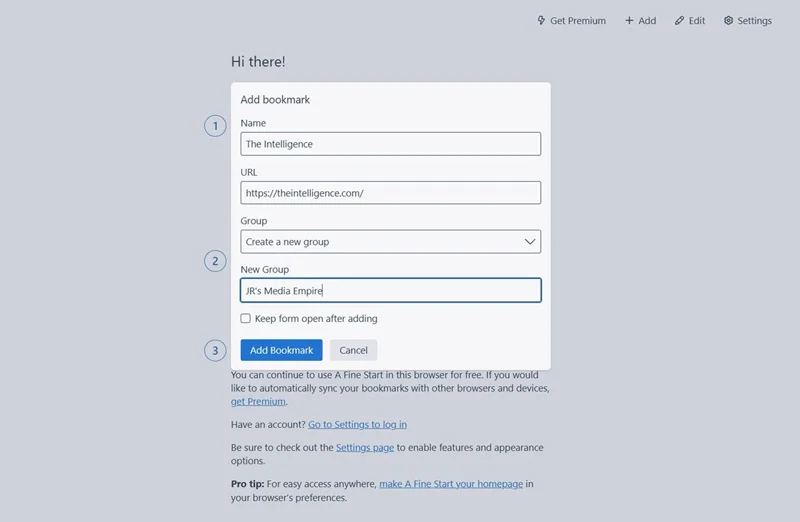
    Adding a new bookmark is as easy as can be.

    Once you’ve added a bunch of bookmarks, you may want to reposition them. Just click the “Edit” button, then drag and drop individual bookmarks or an entire group. You can move items into separate columns to further distinguish different categories of bookmarks.
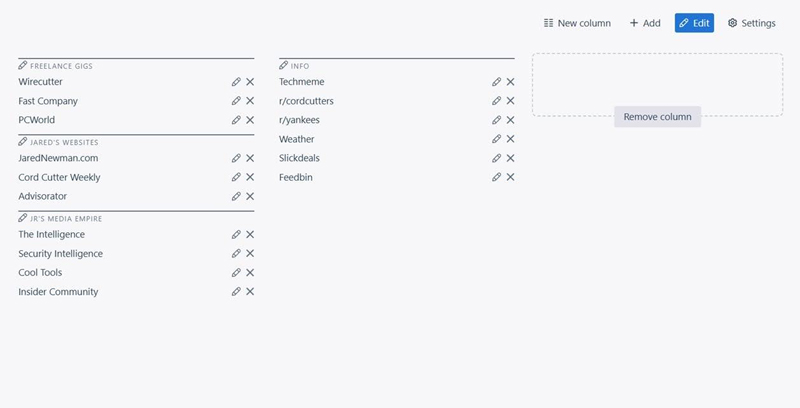
    You can move and reposition items for any arrangement imaginable.

    A Fine Start’s Settings menu is also worth a look. From here you can add a search button, a bulk open setting, an option to expand or collapse your groups, and a “privacy toggle” that hides all your bookmarks (for instance, while screen-sharing). You can customize color themes and buttons in this menu as well.
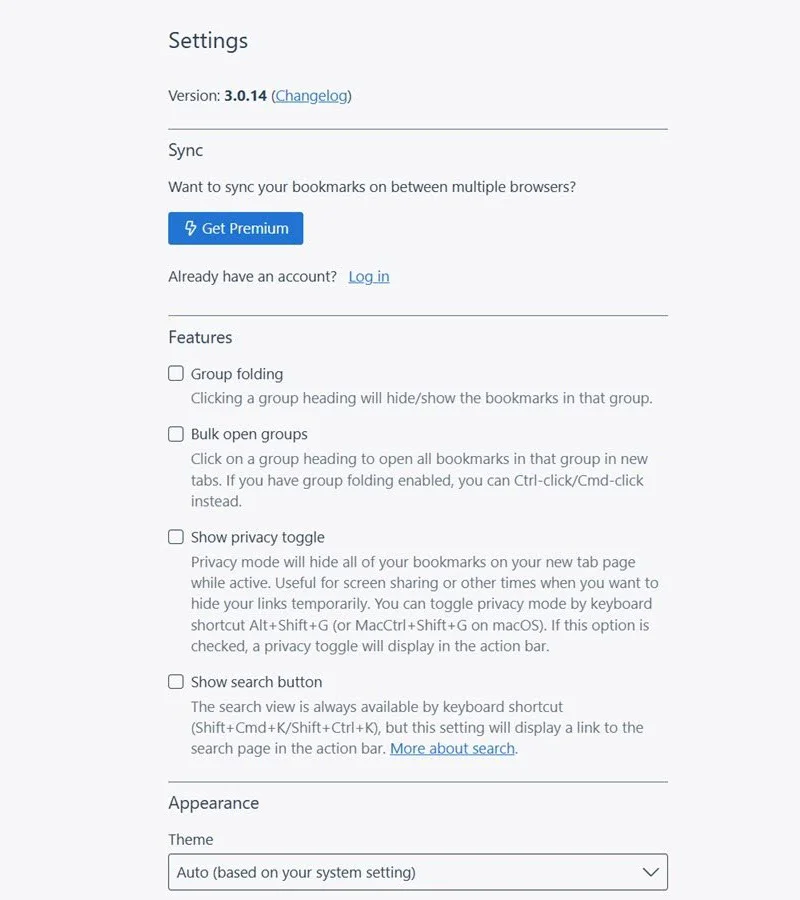
    A Fine Start’s settings screen holds some interesting surprises.

    You should also take note of the Import/Export option in settings. While A Fine Start has a $5-per-month premium option that automatically syncs bookmarks between devices, you can also just manually export the code, and then import it on a new device or browser. Once your bookmarks are all set up, consider keeping your export in a note or file somewhere so it’s easily available for importing later.
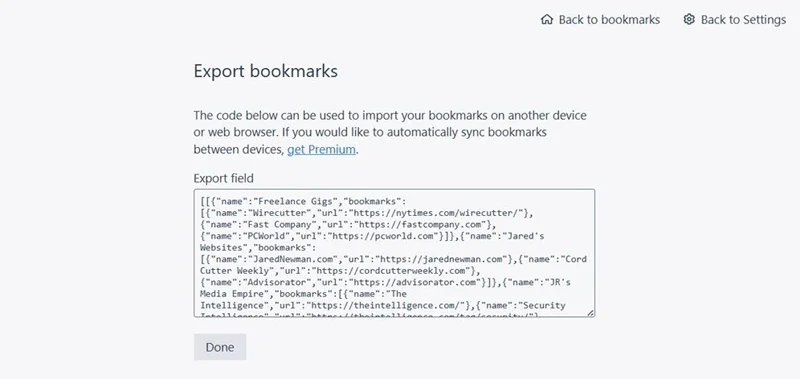
    Exporting your custom homepage setup is easy—and free.

    A Fine Start isn’t alone in providing a simpler, bookmark-driven new tab page, but I appreciate its easy setup, clean presentation, and lack of overwhelming customization options. It also emphasizes privacy, as your bookmarks only are stored on-device unless you pay for the optional sync service.

    Best of all, it works in any browser, so you can switch from Chrome to Firefox to Vivaldi to Brave to Opera to Helium to Safari (and so on), and easily keep the same list of bookmarks handy. That’s the whole point of having them, isn’t it?

    • A Fine Start is available as an extension on Chrome, Firefox, and Chromium-based browsers, and as a bookmarkable web page in other browsers like Safari.
    • The site is free to use with no bookmark limits or access restrictions. An optional $5-per-month subscription syncs bookmarks across devices, but manual importing and exporting is free.
    • A Fine Start uses your browser’s local storage to save bookmarks and other data, so the developer does not have access to them. No sign-up is necessary unless you pay for the sync service.

    Treat yourself to all sorts of brain-boosting goodies like this with the free Cool Tools newsletter—starting with an instant introduction to an incredible audio app that’ll tune up your days in truly delightful ways.


    Source link

    Share. Facebook Twitter Pinterest LinkedIn Tumblr Email

    Related Posts

    What Is Online Reputation Management and Why Does It Matter?

    September 20, 2026

    Why the Latest AI Model Isn’t Always the Best Business Decision

    September 20, 2026

    Top 7 International Franchise Opportunities

    September 20, 2026
    Top News
    US Politics 8 Mins Read

    Even John Bolton Doesn’t Deserve This

    US Politics 8 Mins Read

    Politics / August 25, 2025 Trump’s former nationwide safety adviser is a really hateable determine.…

    Holiday treats recalled from stores nationwide: Don’t let these mislabeled products spoil your Christmas party

    December 24, 2025

    Canada Joins UK With Up To Life In Prison For Hate Speech

    October 2, 2025

    Facebook takes down group page accused of doxing ICE 

    October 15, 2025
    Top Trending
    Business 12 Mins Read

    What Is Online Reputation Management and Why Does It Matter?

    Business 12 Mins Read

    Online Reputation Management, or ORM, is your strategy for controlling how your…

    World Politics 1 Min Read

    Waltham Faces Chelsea in JV Football Showdown

    World Politics 1 Min Read

    Waltham and Chelsea are set to clash in a junior varsity football…

    Business 4 Mins Read

    Transform Chrome’s new tab page into the ultimate bookmark launchpad

    Business 4 Mins Read

    Whenever I install a new web browser, one of the first things…

    Categories
    • Business
    • Economy
    • Headline News
    • Top News
    • US Politics
    • World Politics
    About us

    The Populist Bulletin was founded with a fervent commitment to inform, inspire, empower and spark meaningful conversations about the economy, business, politics, government accountability, globalization, and the preservation of American cultural heritage.

    We are devoted to delivering straightforward, unfiltered, compelling, relatable stories that resonate with the majority of the American public, while boldly challenging false mainstream narratives that seem to only serve entrenched elitists, and foreign interests.

    Top Picks

    What Is Online Reputation Management and Why Does It Matter?

    September 20, 2026

    Waltham Faces Chelsea in JV Football Showdown

    September 20, 2026

    Transform Chrome’s new tab page into the ultimate bookmark launchpad

    September 20, 2026
    Categories
    • Business
    • Economy
    • Headline News
    • Top News
    • US Politics
    • World Politics
    Copyright © 2025 Populist Bulletin. All Rights Reserved.

    Type above and press Enter to search. Press Esc to cancel.