Close Menu
    Facebook X (Twitter) Instagram
    TRENDING :
    • A massive tariff refund program is launching. Here’s who actually gets the money
    • OpenAI shifts its focus to business users amid Anthropic pressure
    • A U.S. state just banned big AI data centers. Here’s why it might not be the last
    • Trader Joe’s class action settlement: How to find out if you’re an eligible shopper and claim your money
    • Sustainability is maturing
    • IBM just settled a major anti-DEI case for $17 million
    • 2028 candidates will face a new kind of economic anger 
    • When Nuclear War Is All We Have Left
    Populist Bulletin
    • Home
    • US Politics
    • World Politics
    • Economy
    • Business
    • Headline News
    Populist Bulletin
    Home»Business»This smart streaming clock is the perfect Netflix companion
    Business 4 Mins Read

    This smart streaming clock is the perfect Netflix companion

    Business 4 Mins Read
    Share Facebook Twitter Pinterest LinkedIn Tumblr Telegram Email Copy Link
    Follow Us
    Google News Flipboard
    Share
    Facebook Twitter LinkedIn Pinterest Email


    A lot of the Cool Tools we feature here are about maximizing productivity, but this week, let’s focus instead on a way to budget your precious downtime.

    As someone who ​watches the streaming TV space closely​, I’m well aware of how many choices exist when you sit down in front of the TV. Between Netflix, HBO Max, Hulu, Disney+, Peacock, and more, there are endless things to watch, and not nearly enough time to get through them.

    So before you commit to a new show, here’s a resource to figure out how many hours (or days) of total watch time you’re in for. After all, there’s nothing worse than being stuck on a cliffhanger.

    This tip originally appeared in the free Cool Tools newsletter from The Intelligence. Get the next issue in your inbox and get ready to discover all sorts of awesome tech treasures!

    Estimate watch times the easy way

    To see how long it’ll take to get through the next show you’re streaming, check out a resource called Bingeclock​.

    ➜ Bingeclock​ is a free website that lists the total runtime of any TV series or movie.

    ⌚ Looking up a show takes just a few seconds; there’s no login or registration required.

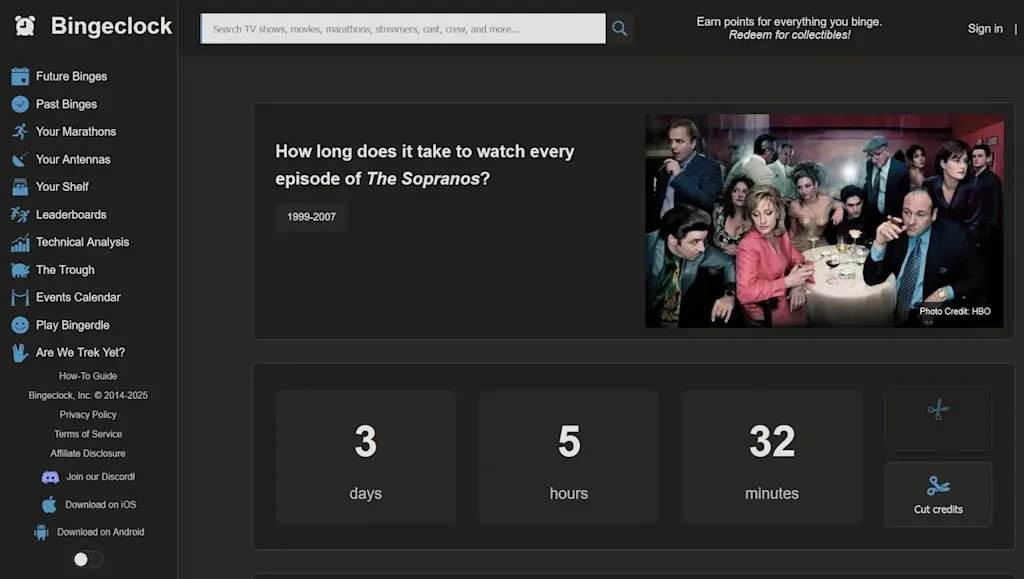
    ✅ To find a total watch time, just type the name of the show or movie into the search box.

    Directly on the search results page, you’ll see how many days, hours, and minutes it’ll take to watch. You can also hit the “Cut credits” button to see what the watch time would be if you skipped that part of the presentation.

    Precise streaming planning is never more than a few clicks away.

    Clicking on a show title leads to a page with more options, including a handy “Daily planning” button that asks how many episodes you intend to watch per day. Choosing a number will update the watch time, showing how many days you’d need to get through the entire series.
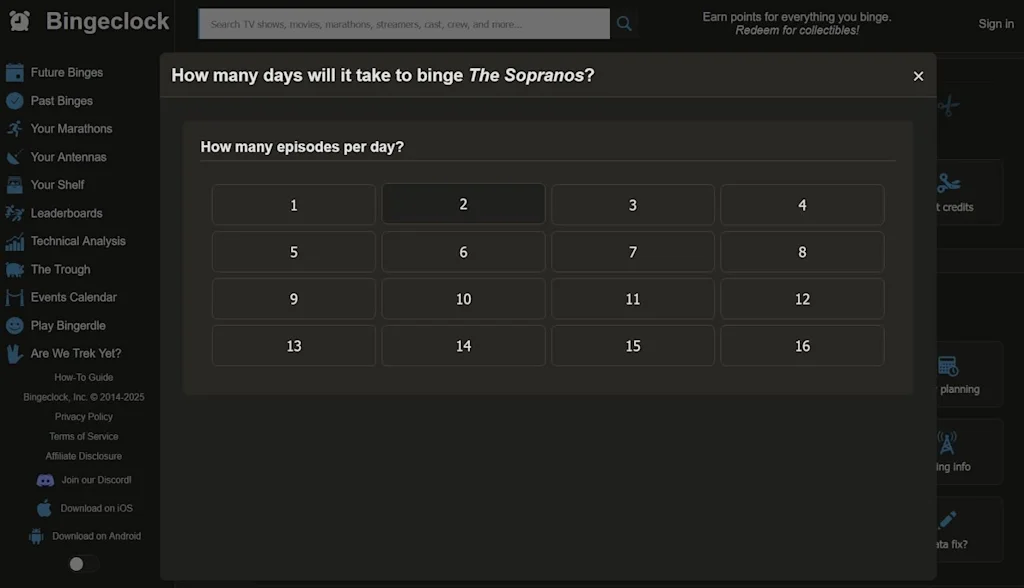
    Bingeclock lets you get incredibly nuanced with mapping out your streaming schedule.

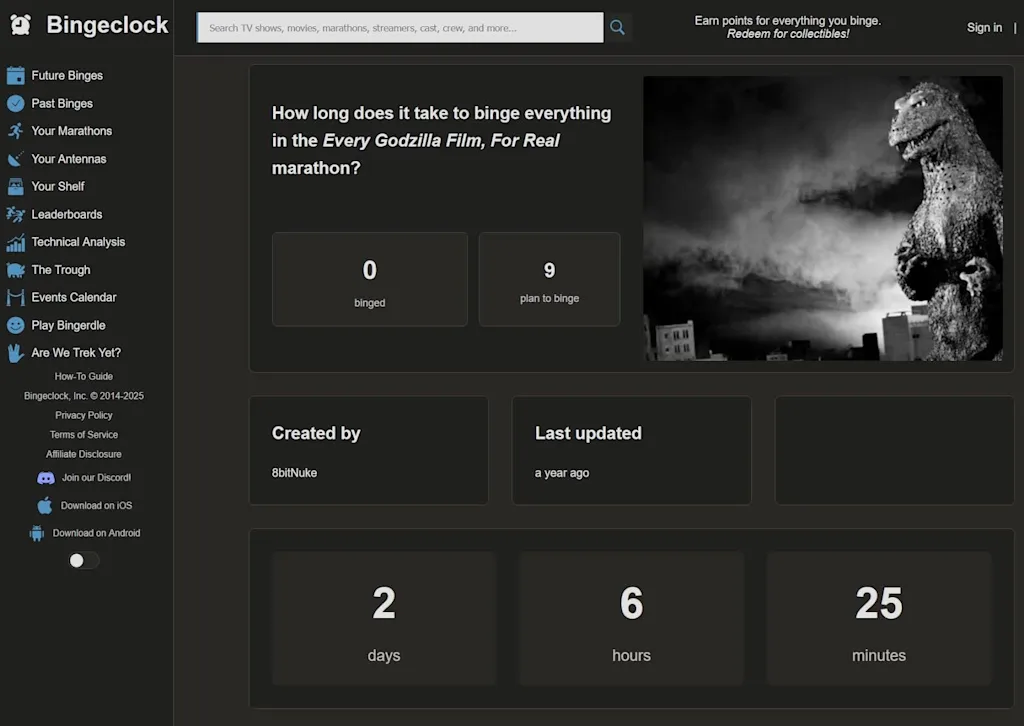
    While you don’t need an account to use Bingeclock, creating one unlocks some interesting extra features—including a watchlist, a log of your past binges, and a way to plan “Marathons” of multiple movies or TV shows. (You can also head to the “Leaderboards” tab to see popular Marathons from others, like the two-day Marathon of every Godzilla movie​.)

    Streaming marathons, in style—thanks to Bingeclock’s intelligent estimates.

    The site has a few other charming oddities. The ​Bingerdie​ game is essentially Wordle, but with terms from popular TV shows, and the Are We Trek Yet?​ subsite shows how many fictional Star Trek advancements have become reality.

    And if all this leaves you feeling even more indecisive about what to watch, just head to the “​Your Antennas​” menu. Here, you’ll be given a virtual tube TV with dozens of seemingly random streaming “channels” to flip through, from Grateful Dead concert footage and Disney theme park walkthroughs to recent robotics demos.
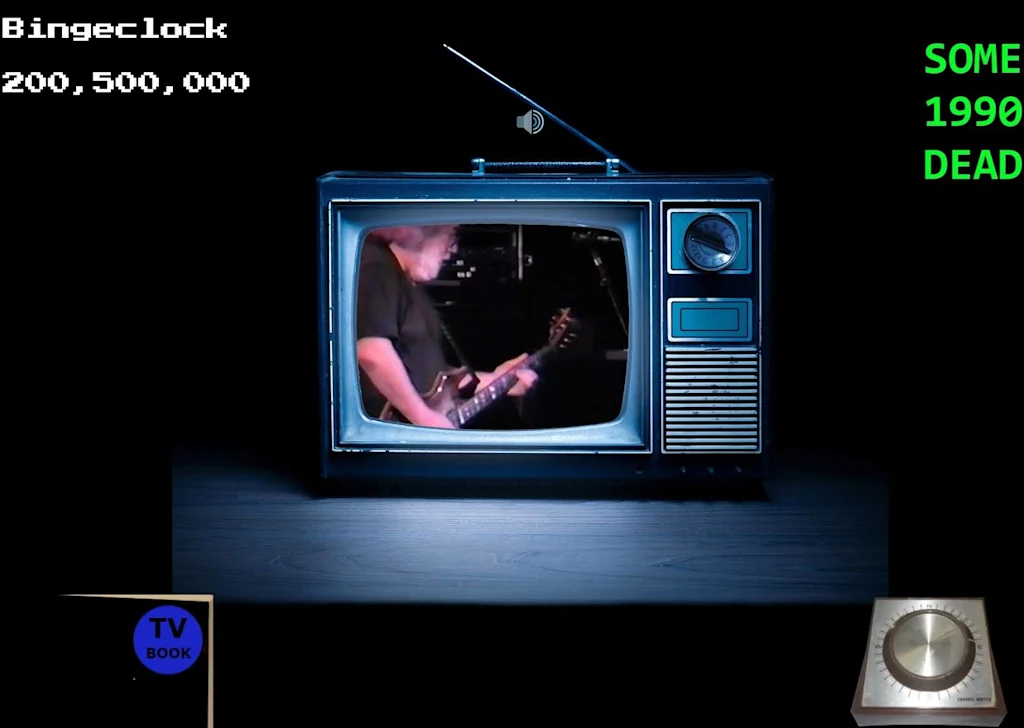
    You never know what you might find in Bingeclock’s on-demand “channels.”

    It’s nice to know that while Bingeclock can help meticulously plot your TV time, it can help you waste it as well.

    • Bingeclock is ​completely web-based​ and will work in any browser, on any device, without any downloads—though the service does also offer ​an Android app​ and a beta-level, ​TestFlight-requiring iOS app​ if you’d rather go that route.
    • It’s completely free to use without any limitations.
    • And you don’t have to provide any personal info whatsoever to use it—though if you do opt to create an account, the site’s privacy policy​ is pretty standard and straightforward about how it does and doesn’t use any associated details.

    Treat yourself to all sorts of brain-boosting goodies like this with the free Cool Tools newsletter—starting with an instant introduction to an incredible audio app that’ll tune up your days in truly delightful ways.


    Source link

    Share. Facebook Twitter Pinterest LinkedIn Tumblr Email

    Related Posts

    A massive tariff refund program is launching. Here’s who actually gets the money

    April 17, 2026

    OpenAI shifts its focus to business users amid Anthropic pressure

    April 17, 2026

    A U.S. state just banned big AI data centers. Here’s why it might not be the last

    April 17, 2026
    Top News
    Business 6 Mins Read

    The ‘Menopause Penalty.’ When biology meets broken work systems

    Business 6 Mins Read

    After 50, too many women reduce their working hours, become trapped in lower-quality jobs, or…

    Courtney Love, Frances Bean Cobain, Send Cease-and-Desist to Journalists Covering Cobain’s 1994 Death | The Gateway Pundit

    August 26, 2025

    Whether you use it or not, better public transit makes your commute better

    February 21, 2026

    California Republicans File Suit to Block Democrats’ Redistricting Plan

    August 22, 2025
    Top Trending
    Business 3 Mins Read

    A massive tariff refund program is launching. Here’s who actually gets the money

    Business 3 Mins Read

    A tariff refund program will open next week following the invalidation of President…

    Business 6 Mins Read

    OpenAI shifts its focus to business users amid Anthropic pressure

    Business 6 Mins Read

    The same ChatGPT chatbot that gave OpenAI’s chief financial officer Sarah Friar…

    Business 4 Mins Read

    A U.S. state just banned big AI data centers. Here’s why it might not be the last

    Business 4 Mins Read

    As tech’s titans sprint to build a sprawling web of data centers…

    Categories
    • Business
    • Economy
    • Headline News
    • Top News
    • US Politics
    • World Politics
    About us

    The Populist Bulletin was founded with a fervent commitment to inform, inspire, empower and spark meaningful conversations about the economy, business, politics, government accountability, globalization, and the preservation of American cultural heritage.

    We are devoted to delivering straightforward, unfiltered, compelling, relatable stories that resonate with the majority of the American public, while boldly challenging false mainstream narratives that seem to only serve entrenched elitists, and foreign interests.

    Top Picks

    A massive tariff refund program is launching. Here’s who actually gets the money

    April 17, 2026

    OpenAI shifts its focus to business users amid Anthropic pressure

    April 17, 2026

    A U.S. state just banned big AI data centers. Here’s why it might not be the last

    April 17, 2026
    Categories
    • Business
    • Economy
    • Headline News
    • Top News
    • US Politics
    • World Politics
    Copyright © 2025 Populist Bulletin. All Rights Reserved.

    Type above and press Enter to search. Press Esc to cancel.