
Close Menu
    Facebook X (Twitter) Instagram
    TRENDING :
    • Nvidia’s Jensen Huang shares 3 key points about the future of AI
    • AWS says AI agents can work on their own. It’s also building tools to keep them in line
    • This hidden Gemini feature uses AI to teach you to be a tech savant
    • Leaked documents reveal details in the U.S.-Iran deal to end the war
    • Rivian layoffs: Electric SUV maker slashes hundreds of jobs in bid for profitability after R2 launch
    • Human Prehistory and How Societies Rise and Fall—With Patrick Wyman
    • Silicon Valley is building medical answers. Medicine needs judgment
    • “Step One, Find the Billionaire Money. Step Two, Take the Billionaire Money”: A Conversation With Alexis Goldstein
    Populist Bulletin
    • Home
    • US Politics
    • World Politics
    • Economy
    • Business
    • Headline News
    Populist Bulletin
    Home»Business»This hidden Gemini feature uses AI to teach you to be a tech savant
    Business 4 Mins Read

    This hidden Gemini feature uses AI to teach you to be a tech savant

    Business 4 Mins Read
    Share Facebook Twitter Pinterest LinkedIn Tumblr Telegram Email Copy Link
    Follow Us
    Google News Flipboard
    Share
    Facebook Twitter LinkedIn Pinterest Email


    A few weeks ago, Google Gemini taught me some new graphic design skills.

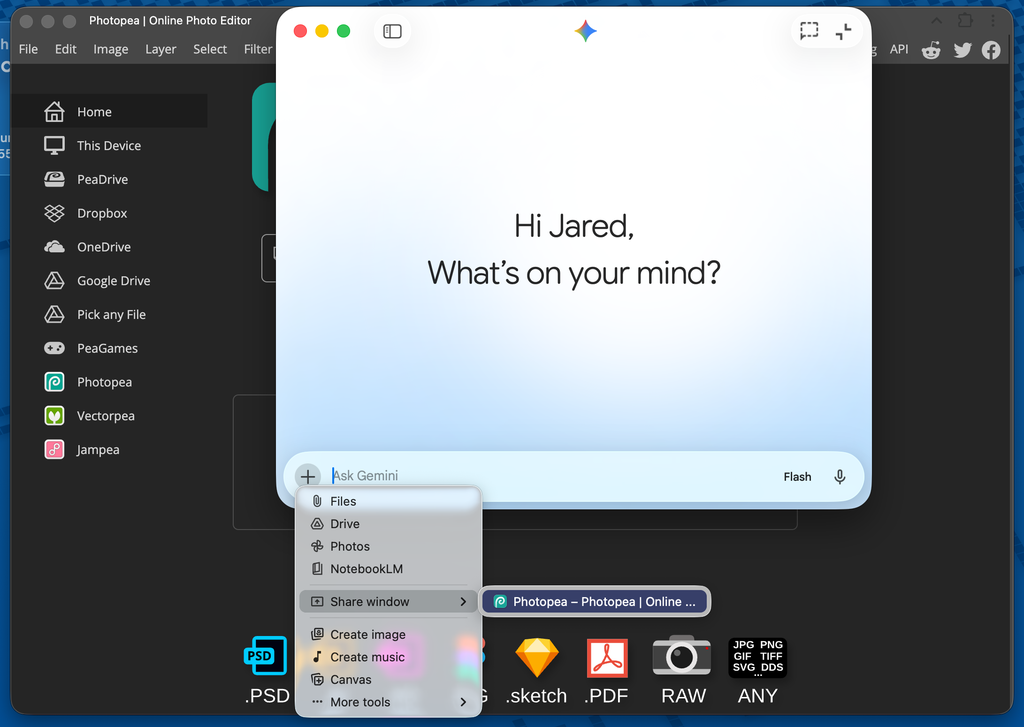
    I was editing a screenshot in Photopea, a free online Photoshop alternative, and wanted to place the image over a colorful border with a drop shadow behind it. Instead of digging through documentation or looking for YouTube tutorials, I just shared a live view of my web browser with Gemini and asked for guidance. Google’s AI assistant proceeded to walk me through Photopea’s complex menus step by step.

    This is the most underrated feature of Gemini’s Mac app, which launched in April. While other desktop AI apps have increasingly focused on taking direct control of your computer, Gemini’s app still sees the value of teaching you to do things on your own.

    Looking over your shoulder

    When you click the + button in Gemini’s Mac app, you’ll see a Share Window among Gemini’s list of tools. Dragging your cursor over this option brings up a list of open windows to share with Google’s AI assistant.

    (This feature does require some extra privacy permissions, enabled under Settings > Privacy & Security > Screen & System Audio Recording. From there you can turn on the Gemini toggle so that the app can automatically take screenshots.)

    Once you’ve shared a window with Gemini, it will take a screenshot of that window each time you post a question. That means you can use Gemini alongside your other apps and get help along the way.

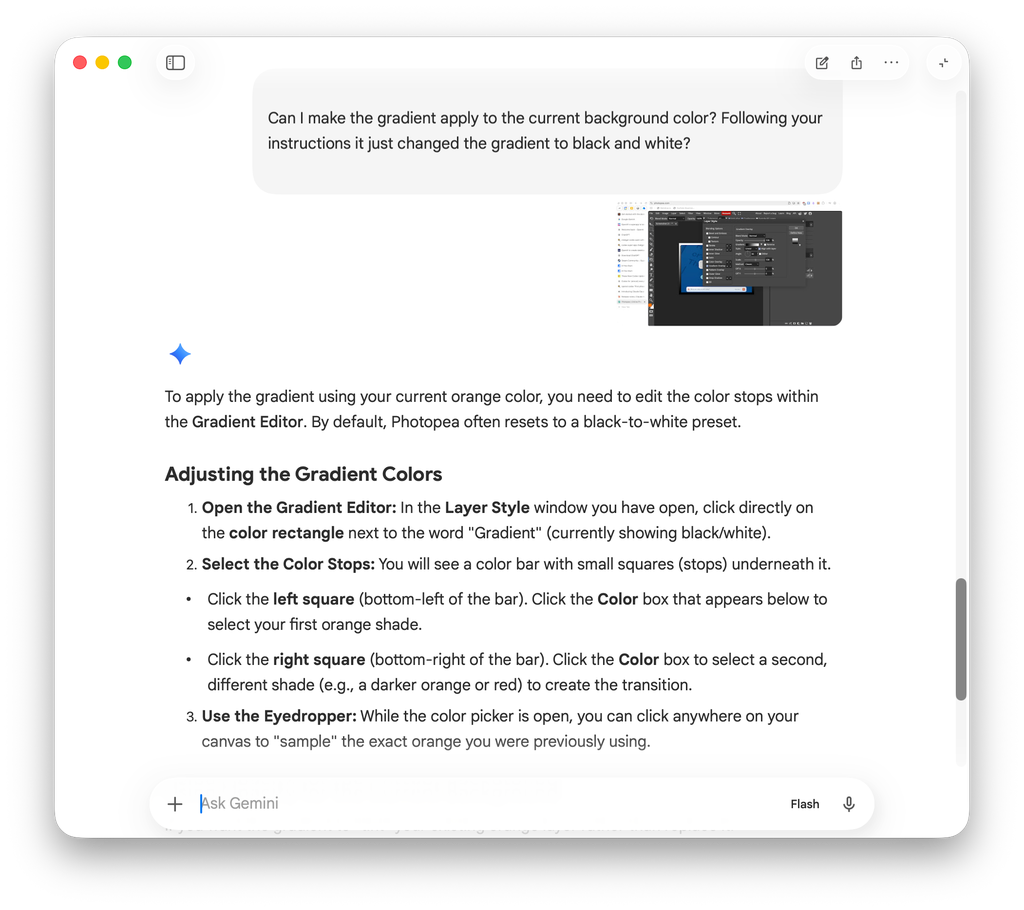
    While creating my image border in Photopea, for instance, I ran into some trouble applying a gradient effect to my background. In response, Gemini looked at which menu was open in Photopea and told me exactly which buttons to click from there, citing Photopea’s online documentation.
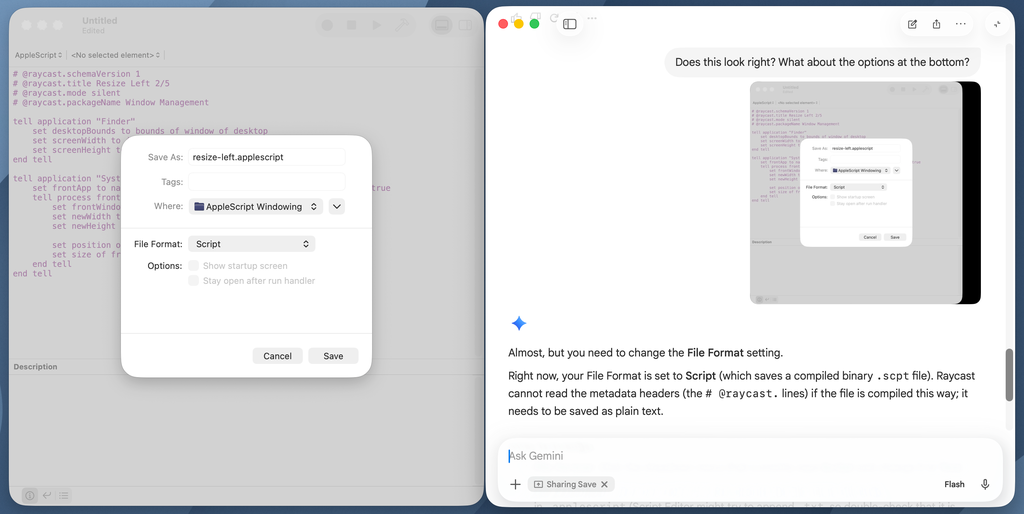
    I’ve since used Gemini for guidance in couple of other software interactions. It helped me navigate the labyrinthine Fangraphs website while looking up some recent baseball statistics, and after I vibe coded a couple of Raycast scripts for window management, it led me through Raycast’s Settings menu to enable them.
    Other desktop AI apps have their own built-in ways to share your screen, but the process is clunkier. ChatGPT and Claude both require you to manually add new screenshots when something changes on your screen, and in Claude you must click and drag to define the capture area each time. Gemini’s Share Window mode feels more like a teacher that looks over your shoulder and offers guidance as needed.
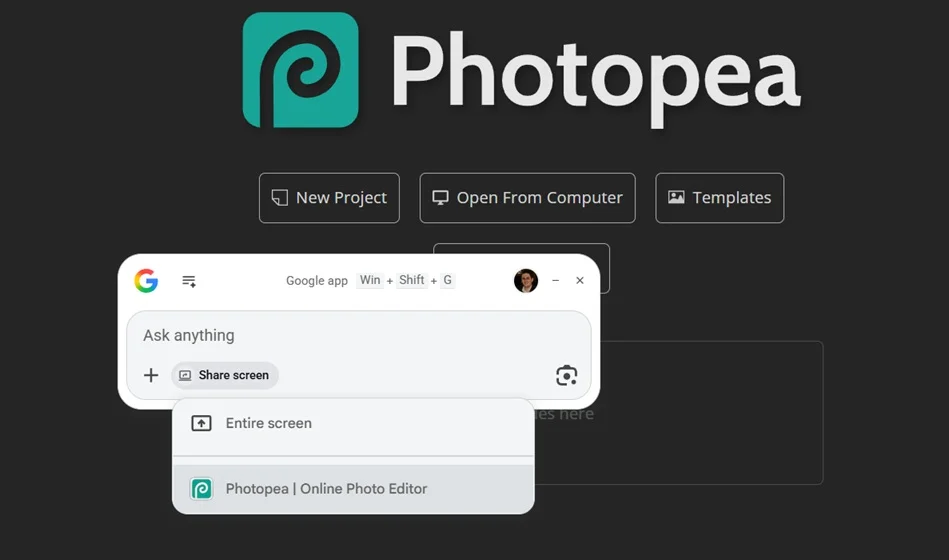
    While there’s no desktop Gemini app for Windows, Google offers a separate Google app for desktop on Windows with a similar share screen feature. The main difference is that the conversation flows through Google Search’s AI Mode rather than Gemini. (Microsoft’s Copilot app also has a screen-sharing feature, though in my experience its instructions haven’t been as helpful.)

    What’s next

    Instead of teaching you to use your computer more effectively, Google’s rivals are focusing more on controlling your computer themselves.

    Both Claude’s desktop app and OpenAI’s ChatGPT Codex app now offer Computer Use modes that can navigate through your desktop with virtual cursors and keyboards, using persistent screenshots to guide them along. The hope is that you’ll be able to automate complex computing tasks even when you’re not at the computer yourself.

    Google seems likely to go down this path before long. While the Gemini app can’t control your computer today, Google started previewing a Computer Use model for Gemini last fall.

    But full computer control has its downsides. Anthropic warns of security risks from malicious apps and web pages, which could ask Claude to override the user’s own instructions. It also cautions against letting AI make decisions with “meaningful real-world consequences,” at least not without seeking human confirmation first. AI is also just a lot slower at clicking through buttons and menus, and letting these companies see everything on your screen is a potential privacy nightmare.

    My hope, then, is that even as computer use becomes a bigger focus, Google doesn’t give up on allowing AI to play the role of software tutor. Not every computing task needs to be automated away, and there’s always value in learning to do it yourself.


    Source link

    Share. Facebook Twitter Pinterest LinkedIn Tumblr Email

    Related Posts

    Nvidia’s Jensen Huang shares 3 key points about the future of AI

    June 17, 2026

    AWS says AI agents can work on their own. It’s also building tools to keep them in line

    June 17, 2026

    Leaked documents reveal details in the U.S.-Iran deal to end the war

    June 17, 2026
    Top News
    Business 3 Mins Read

    Applebee’s store closures: See an updated list of locations that a bankrupt franchisee wants to shutter

    Business 3 Mins Read

    A large Applebee’s franchisee that filed for Chapter 11 protection in March is seeking to…

    To My Fellow Journalists: We Need to Do Better

    April 16, 2026

    Vice President JD Vance to Host ‘The Charlie Kirk Show’ from the White House on Monday | The Gateway Pundit

    September 15, 2025

    7 Best Twitter Scheduling Tools to Maximize Your Social Strategy

    December 30, 2025
    Top Trending
    Business 7 Mins Read

    Nvidia’s Jensen Huang shares 3 key points about the future of AI

    Business 7 Mins Read

    Nvidia CEO Jensen Huang — whose work helped propel artificial intelligence —…

    Business 9 Mins Read

    AWS says AI agents can work on their own. It’s also building tools to keep them in line

    Business 9 Mins Read

    The marketing pitch for enterprise AI’s autonomous agents has started to sound…

    Business 4 Mins Read

    This hidden Gemini feature uses AI to teach you to be a tech savant

    Business 4 Mins Read

    A few weeks ago, Google Gemini taught me some new graphic design…

    Categories
    • Business
    • Economy
    • Headline News
    • Top News
    • US Politics
    • World Politics
    About us

    The Populist Bulletin was founded with a fervent commitment to inform, inspire, empower and spark meaningful conversations about the economy, business, politics, government accountability, globalization, and the preservation of American cultural heritage.

    We are devoted to delivering straightforward, unfiltered, compelling, relatable stories that resonate with the majority of the American public, while boldly challenging false mainstream narratives that seem to only serve entrenched elitists, and foreign interests.

    Top Picks

    Nvidia’s Jensen Huang shares 3 key points about the future of AI

    June 17, 2026

    AWS says AI agents can work on their own. It’s also building tools to keep them in line

    June 17, 2026

    This hidden Gemini feature uses AI to teach you to be a tech savant

    June 17, 2026
    Categories
    • Business
    • Economy
    • Headline News
    • Top News
    • US Politics
    • World Politics
    Copyright © 2025 Populist Bulletin. All Rights Reserved.

    Type above and press Enter to search. Press Esc to cancel.