
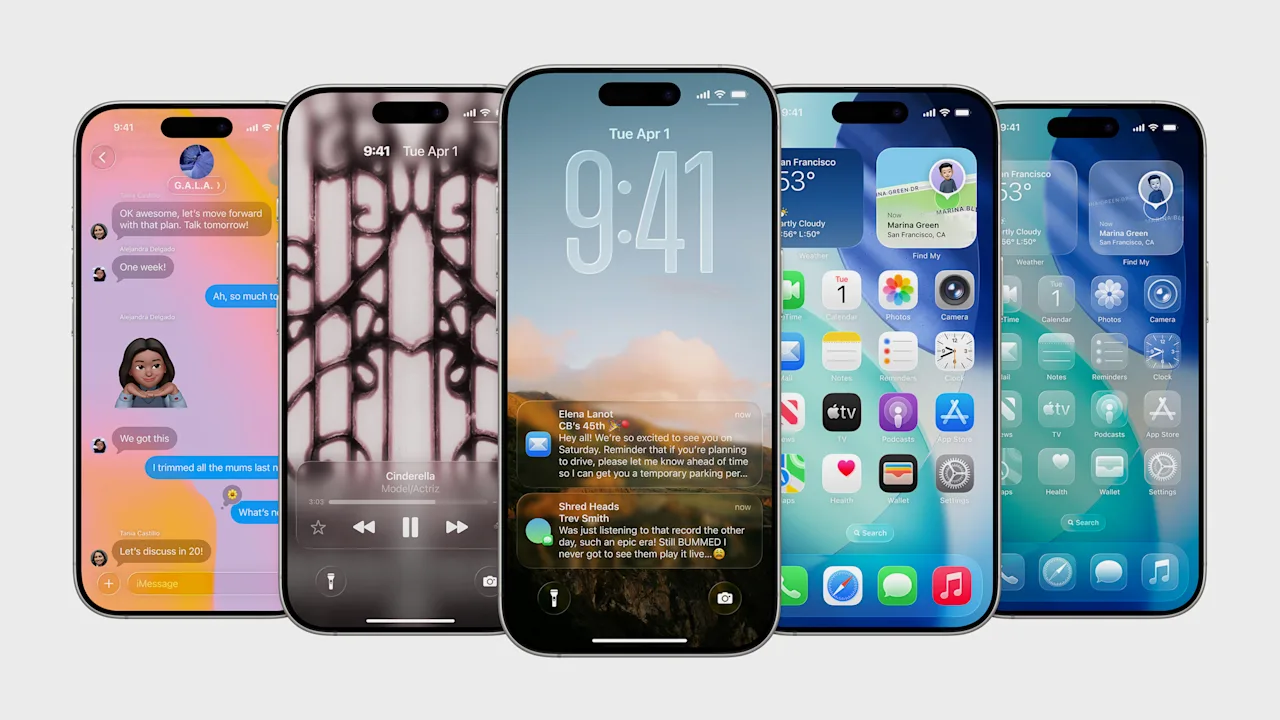
On Monday, Apple will release the iPhone’s next operating system, iOS 26, to the general public. The new operating system features the most radical redesign of the iPhone’s software in over a decade. Gone are iOS’s flat, minimalist interface elements, replaced by a new transparent design language called Liquid Glass.
But iOS 26 is offering iPhones more than a facelift. The new operating system is also packed with new features, including more advanced AI tools, a revamped calling experience, an all-new Games app, and dozens of enhancements to major apps, including Maps, Photos, Messages, and more.
If you plan on upgrading to iOS 26, however, there are a few steps you should take before installing the iPhone’s new operating system. Here’s how to get your iPhone ready for iOS 26.
Make sure your iPhone will run iOS 26
First, be sure your iPhone can actually run iOS 26. The great news is that the new OS supports a ton of older iPhone models—more than two dozen. The bad news is that if your iPhone was released before 2019, it won’t be capable of running iOS 26.
With the release of iOS 26, Apple is dropping support for three iPhone models that can currently run iOS 18: the iPhone XS, the iPhone XS Max, and the iPhone XR. All three models were released in 2018, and none will support iOS 26, likely because they don’t possess the graphics or processing power to run the new Liquid Glass design adequately.
Yet Apple has still managed to offer iOS 26 support on iPhones that first came out six years ago—and every model since. Here are all 30 models of iPhone that can run iOS 26:
- iPhone 17
- iPhone Air
- iPhone 17 Pro
- iPhone 17 Pro Max
- iPhone 16e
- iPhone 16
- iPhone 16 Plus
- iPhone 16 Pro
- iPhone 16 Pro Max
- iPhone 15
- iPhone 15 Plus
- iPhone 15 Pro
- iPhone 15 Pro Max
- iPhone 14
- iPhone 14 Plus
- iPhone 14 Pro
- iPhone 14 Pro Max
- iPhone 13
- iPhone 13 mini
- iPhone 13 Pro
- iPhone 13 Pro Max
- iPhone 12
- iPhone 12 mini
- iPhone 12 Pro
- iPhone 12 Pro Max
- iPhone 11
- iPhone 11 Pro
- iPhone 11 Pro Max
- iPhone SE (3rd generation)
- iPhone SE (2nd generation)
If you have any of these iPhones, you’ll be able to install iOS 26 onto them. However, note that some features, such as those powered by Apple Intelligence, will require more recent iPhone models, including the iPhone 15 Pro and above.
Make sure your iPhone is already running the latest iOS
When upgrading to a new OS, the installation process—including carrying over all your data without a hitch—tends to run more smoothly, some believe, if the iPhone you are upgrading is currently running the latest iOS.
Whether this advantage is actually true is a matter of debate. Still, it doesn’t hurt to ensure that your iPhone is running the latest operating system before upgrading to iOS 26. As of the time of this writing, the latest operating system for the iPhone is 18.6.2.
To upgrade to the latest iOS (before iOS 26 is released), do the following on your iPhone:
- Open the Settings app.
- Tap General.
- Tap Software Update.
Your iPhone will then check to make sure it is running the latest operating system, and if it is not, it will prompt you to upgrade by tapping the “Update Now” button.
Free up your iPhone’s storage space
Our iPhones often get cluttered with apps we don’t use, games we don’t play, and documents and photos we no longer need. All this leads to excess data on our phones, which takes up valuable storage. And when installing a major new operating system, the most critical thing you need for the installation process is enough storage space.
Depending on which iPhone model you are upgrading, you may need 10GB or more of free storage space on your device. If you don’t have it, then your iPhone won’t be able to download the new OS’s installer files.
Usually, the biggest storage hogs on iPhones are games and media files. If you need to free up a lot of storage space quickly, consider deleting any unnecessary types of this kind of data, with the caveat that you should always keep a backup of the files you will be deleting, so you can recover them later if needed.
If you need help discovering what may be hogging the most space on your iPhone, you can do so by doing the following:
- Open the Settings app.
- Tap General.
- Tap iPhone Storage.
From this screen, your iPhone will even recommend which files and apps may be able to be deleted, allowing you to free up storage space.
Back up your iPhone
There is one more crucial thing you should do before upgrading your iPhone to iOS 26: back up your device. By backing up your iPhone first, you’ll ensure that you have a copy of your iPhone data in the rare instance that the iOS 26 installation process goes horribly wrong and you lose all your data.
Apple allows you to back up your iPhone through several methods, including creating a backup on your Mac or PC. However, the easiest way to back up your iPhone is to use the iCloud Backup feature. iCloud Backup stores your iPhone data in the cloud, where Apple keeps it safe. You can use this data to restore an older iPhone—or a brand new one—with all your data.
To back up your iPhone using iCloud Backup before installing iOS 26, do the following:
- Open the Settings app.
- Tap your Apple Account ID.
- Tap iCloud.
- Tap iCloud Backup.
- Tap Back Up Now.
You can view Apple’s instructions for all available iPhone backup options here.
Apple will make iOS 26 available to the general public on Monday, September 15.