
Close Menu
    Facebook X (Twitter) Instagram
    TRENDING :
    • ROMTech CEO Peter Arn on Scaling Home Rehab Care
    • DNC Chair Ken Martin Made Democrat Officials Sign Non-Disclosure Agreements Before Viewing the Party’s Finances * The Gateway Pundit * by Mike LaChance
    • Is It Possible to Moonlight Ethically, Especially in Tech?
    • There Are Two Distinct Reasons Why Democrats and the Media Lost Their Minds Over Trump’s Speech Tonight * The Gateway Pundit * by Mike LaChance
    • How AI Exposed the Real Cause of Slow Decision-Making
    • President Trump Lays Bare Massive GBI Strategies Fake Voter Registration Scam The Gateway Pundit Broke in August 2023
    • How to Stand Out in a Crowded Agency Market
    • UNHINGED! Far-Left Georgia Senator Jon Ossoff Goes on Pathetic Meltdown Ahead of Trump’s Highly Anticipated Speech – Whines Planned Declassification of 2020 Election Intel a “Presidential Misconduct”
    Populist Bulletin
    • Home
    • US Politics
    • World Politics
    • Economy
    • Business
    • Headline News
    Populist Bulletin
    Home»Business»Here’s the meeting planning magic trick Google Calendar is missing
    Business 4 Mins Read

    Here’s the meeting planning magic trick Google Calendar is missing

    Business 4 Mins Read
    Share Facebook Twitter Pinterest LinkedIn Tumblr Telegram Email Copy Link
    Follow Us
    Google News Flipboard
    Share
    Facebook Twitter LinkedIn Pinterest Email


    Imagine you need to organize a meeting with people in Portland, Tokyo, and Sydney at the same time. Off the top of your head, what’s a time that’d actually work for everyone?

    Don’t feel bad if you’re befuddled. Time zones are confusing! You can try to memorize the time difference between different cities, but even that only works some of the time. Daylight Saving changes the time in some places but not others, for one thing—and in the hemisphere opposite yours, it changes it in the opposite direction.

    That’s why you shouldn’t try to schedule meetings across time zones off the top of your head. No matter how crafty you may be, there are just too many factors to keep in mind.

    But—oh, yes—there is a better way.

    This tip originally appeared in the free Cool Tools newsletter from The Intelligence. Get the next issue in your inbox and get ready to discover all sorts of awesome tech treasures!

    Your new time zone supertool

    Agreeing on a time to meet with people in cities around the globe means finding a time where everyone is online—or at the very least awake.

    And that’s exactly where Zoneless​ comes in.

    ➜ Zoneless is a free website for figuring out overlapping meeting times across multiple time zones.

    ⌚ There’s no setup whatsoever—just head to the site and start adding cities, and you’ll have your optimal time within a minute or less.

    ✅ First, open up the site​—then:

    • Click or tap the search bar to add in whatever cities you want.
    • Look at the time highlighted in yellow in each city’s row. That’s the current time—in each of your locations.
    • Finally, note the times highlighted in green. Those are the hours between 9 a.m. and 5 p.m., for each local time zone (though you can change those “working hours” in the site’s settings, via the gear icon in its upper-right corner, if you want).
    Zoneless gives you a simple visual overview of the best mutual meeting times across multiple time zones.

    💡 The idea, then, is to find a time that’s green for everyone—or at the very least not far from it.

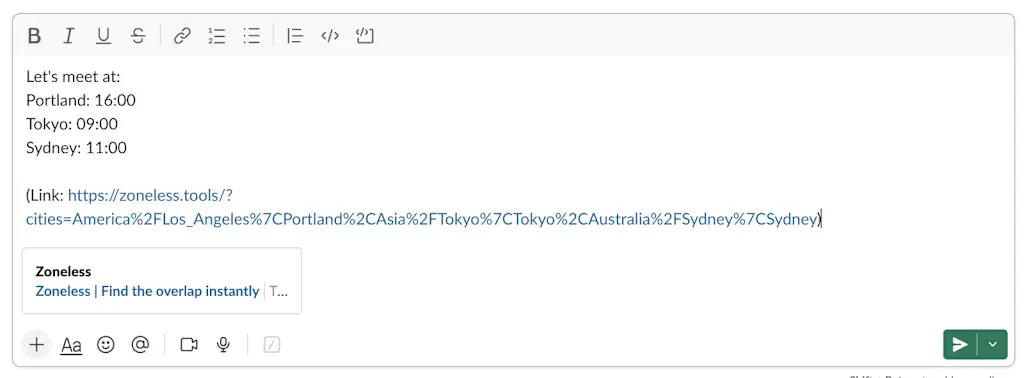
    So, using my example from before, 4 p.m. in Portland works best. At that time, it’s 9 a.m. in Tokyo and 11 a.m. in Sydney (the following day—make sure you pay attention to the dates in the interface!). And that’s incredibly easy to see in the visual Zoneless gave us.

    ☝️ All that’s left is to click the time you choose, and a summary will be copied onto your device’s clipboard—including the times and a link back to the service, in case anyone else wants a more visual view. That also gives the people you’re coordinating with a chance to use the tool themselves to propose a different time, if necessary.
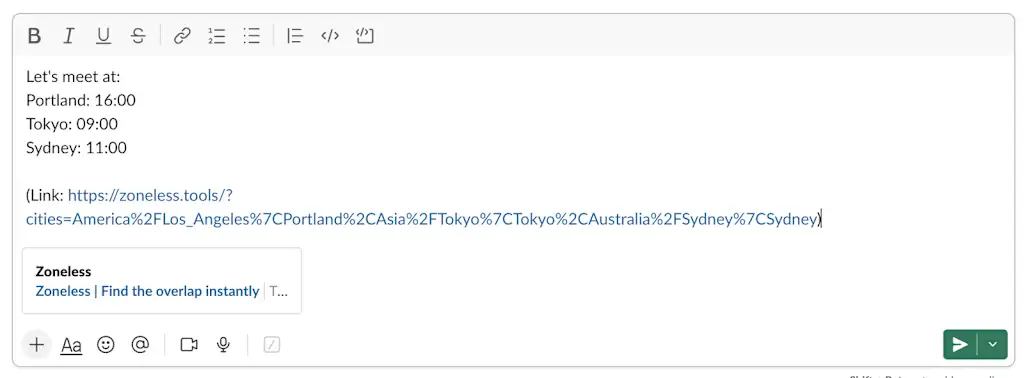
    With a couple quick clicks, your Zoneless discovery will be in an email and ready to send.

    This won’t always work flawlessly, of course. Coordinating a meeting that includes Europe, the U.S., and Asia means someone is going to be getting up early or staying up late (I know this one from experience!).

    But this tool makes it so much easier to figure that out—and, in many cases, to find a time that is reasonably manageable for everyone, wherever they may be.

    • Zoneless is just a website​. You can use it in any browser on any device, without any downloads or installations.
    • It’s completely free.
    • And it doesn’t require any accounts or personal info to be provided—though you can create an account if you want to sync your settings and cities across devices. (The developer says​ the site doesn’t share your email address or do anything disconcerting with your data even if you do opt to do that.)

    Treat yourself to all sorts of brain-boosting goodies like this with the free Cool Tools newsletter—starting with an instant introduction to an incredible audio app that’ll tune up your days in truly delightful ways.


    Source link

    Share. Facebook Twitter Pinterest LinkedIn Tumblr Email

    Related Posts

    ROMTech CEO Peter Arn on Scaling Home Rehab Care

    July 17, 2026

    Is It Possible to Moonlight Ethically, Especially in Tech?

    July 17, 2026

    How AI Exposed the Real Cause of Slow Decision-Making

    July 17, 2026
    Top News
    Business 6 Mins Read

    ‘Skills manifesting’: More workers citing skills they don’t have—but intend to learn—on their résumés

    Business 6 Mins Read

    Many people, Gen Zers in particular, have embraced the practice of “manifesting”: essentially, believing that…

    This photo-tweaking time-saver is a perfect Google Photos power-up

    October 4, 2025

    Energy Protests In Ireland | Armstrong Economics

    April 10, 2026

    Rep. Ilhan Omar Suggests Trump’s America is Worse Than Somalia: ‘I Don’t Remember Ever Witnessing Anything Like That’ (VIDEO) | The Gateway Pundit

    September 15, 2025
    Top Trending
    Business 5 Mins Read

    ROMTech CEO Peter Arn on Scaling Home Rehab Care

    Business 5 Mins Read

    Opinions expressed by Entrepreneur contributors are their own. In 2025, ROMTech had…

    World Politics 2 Mins Read

    DNC Chair Ken Martin Made Democrat Officials Sign Non-Disclosure Agreements Before Viewing the Party’s Finances * The Gateway Pundit * by Mike LaChance

    World Politics 2 Mins Read

    Ken Martin / Screenshot ABC1 Ken Martin, the chairman of the Democratic…

    Business 6 Mins Read

    Is It Possible to Moonlight Ethically, Especially in Tech?

    Business 6 Mins Read

    Opinions expressed by Entrepreneur contributors are their own. Key Takeaways Moonlighting isn’t…

    Categories
    • Business
    • Economy
    • Headline News
    • Top News
    • US Politics
    • World Politics
    About us

    The Populist Bulletin was founded with a fervent commitment to inform, inspire, empower and spark meaningful conversations about the economy, business, politics, government accountability, globalization, and the preservation of American cultural heritage.

    We are devoted to delivering straightforward, unfiltered, compelling, relatable stories that resonate with the majority of the American public, while boldly challenging false mainstream narratives that seem to only serve entrenched elitists, and foreign interests.

    Top Picks

    ROMTech CEO Peter Arn on Scaling Home Rehab Care

    July 17, 2026

    DNC Chair Ken Martin Made Democrat Officials Sign Non-Disclosure Agreements Before Viewing the Party’s Finances * The Gateway Pundit * by Mike LaChance

    July 17, 2026

    Is It Possible to Moonlight Ethically, Especially in Tech?

    July 17, 2026
    Categories
    • Business
    • Economy
    • Headline News
    • Top News
    • US Politics
    • World Politics
    Copyright © 2025 Populist Bulletin. All Rights Reserved.

    Type above and press Enter to search. Press Esc to cancel.