
Close Menu
    Facebook X (Twitter) Instagram
    TRENDING :
    • This landmark climate change case is coming to a head in Paris as France suffers from extreme heat
    • 17 Rappers Have Supported Trump
    • How a bizarre subway announcement became TikTok’s latest remix obsession
    • It’s Official: Palestine Has Changed US Politics Forever
    • The most transformational investment in fragile nations isn’t what you think 
    • Data Center Opposition Is Uniting Communities—With Saul Levin
    • The Big Freeze: Why teams seize up under pressure (and how to avoid it)
    • How I Became an American
    Populist Bulletin
    • Home
    • US Politics
    • World Politics
    • Economy
    • Business
    • Headline News
    Populist Bulletin
    Home»Business»These 4 advanced features unlock Gemini’s true power
    Business 4 Mins Read

    These 4 advanced features unlock Gemini’s true power

    Business 4 Mins Read
    Share Facebook Twitter Pinterest LinkedIn Tumblr Telegram Email Copy Link
    Follow Us
    Google News Flipboard
    Share
    Facebook Twitter LinkedIn Pinterest Email


    Look, we all know the drill by now: You type a question into the magic AI box, and the magic AI box spits out an answer that is usually pretty good, occasionally mind-blowing, and every once in a blue moon mind-blowingly bizarre.

    But if you’re just treating Google Gemini like a glorified search bar, you’re leaving a lot of utility on the table. It’s sort of like buying a Swiss Army knife and only ever using the toothpick.

    If you want to move past the beginner phase and actually make Gemini work for you, here are four tricks that might not be immediately obvious but are surprisingly handy.

    Stop copy-pasting your own emails

    If you’re trying to summarize a long email thread or find a specific document to pull data from, your first instinct is probably to open a new tab, find the email, copy the text, go back to Gemini, paste it in, and then ask your question.

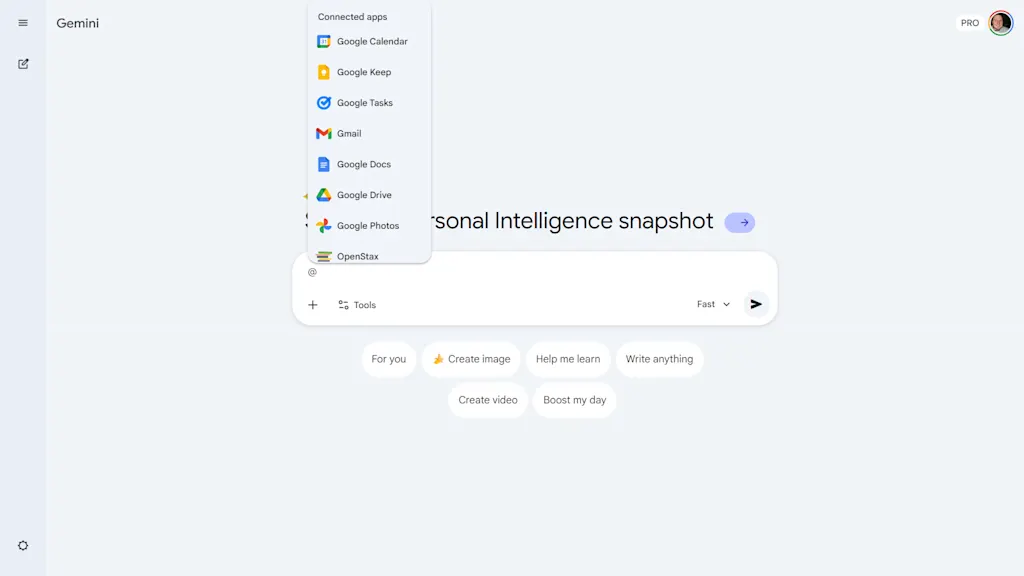
    No need: Gemini has “Extensions” built right in. If you want to know when your flight is or summarize a Doc, just type @ in the prompt box. You’ll see a menu pop up for Google Docs, Gmail, Drive, Maps, and other Google services.

    Select one, and say something like, “@Gmail find the email from Bob about the Q3 budget and summarize the main points.” It goes and finds the info, saving you from tab fatigue. If you need to turn on these extensions, here’s how.

    The “trust but verify” button

    Use AI long enough and you’ll eventually come across “hallucinations,” which is a polite way of saying the AI just made something up because it sounded good.

    If you’re using Gemini for important research, make sure to use the “Double-check response” feature, which can be found by clicking the three-dot icon at the bottom of a response.
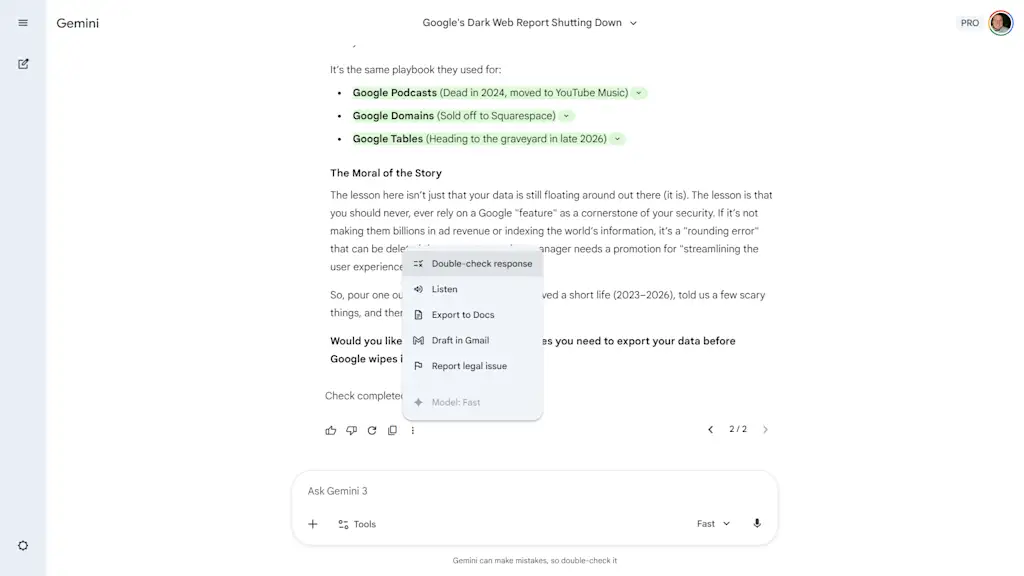
    When you click it, Google runs a search to see if there’s content on the web to substantiate what the AI just told you. A green highlight means Google found a search result that supports the statement, while an orange highlight means Google either found content that might contradict it, or it couldn’t find a match.

    It’s not foolproof, but it’s a helpful extra step to take in order to make sure Google’s info isn’t too far off base.

    Tables and spreadsheets

    We’re used to chatbots just . . . chatting. But if you’re trying to make a decision, like comparing three different project management tools or deciding among five hotels for that Nashville trip, paragraphs of text are actually pretty annoying to parse.

    You can force Gemini to make information more digestible by telling it, for example: “Output this as a table comparing [Option A] and [Option B] based on price, reviews, and features.”
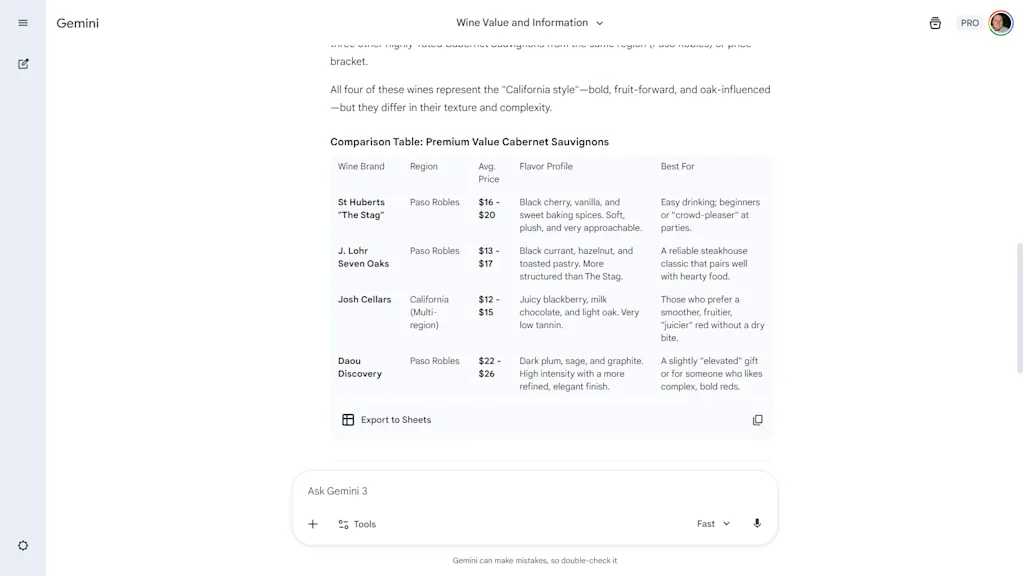
    It’ll organize the messy data into a clean grid. And if you’re feeling especially ambitious, you’ll notice an “Export to Sheets” icon underneath the table.

    One click creates a brand-new Google Sheet with all that data populated, formatted, and saved to your Google Drive. It turns cumbersome manual data entry into a single button press.

    Audio uploads

    Most people know Gemini can read text and look at pictures. But it also has ears.

    If you have a recording of a chaotic 45-minute meeting, a rambling lecture, or an interview you recorded on your phone, don’t waste your time listening to it at 2x speed.
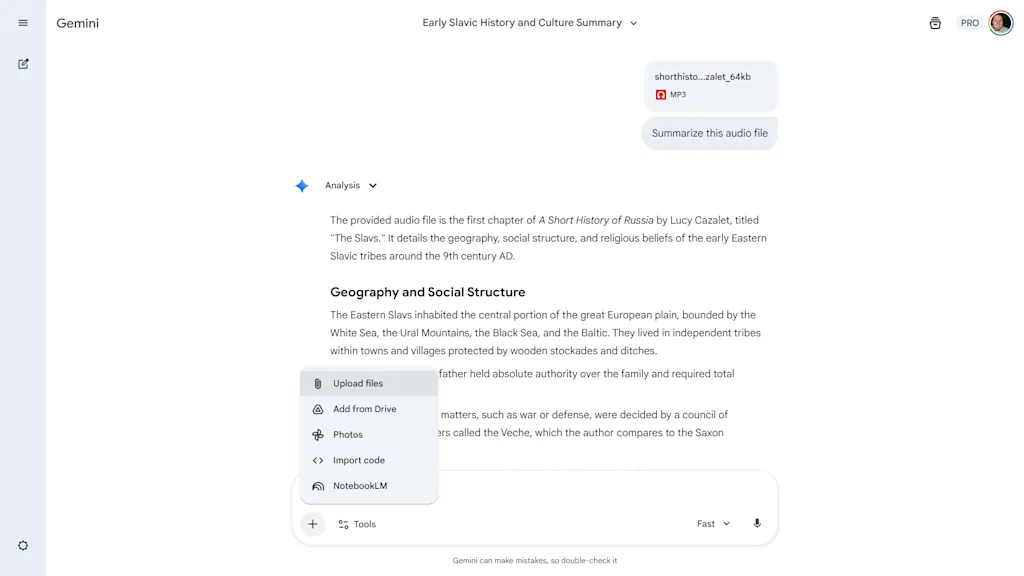
    You can upload audio files directly into the prompt bar. Just click the plus (+) icon, select Upload files, and drop in your audio clip.

    Then ask for what you need: “Summarize this meeting and extract the three action items assigned to me” or “Find the timestamp where they discuss the Q3 budget,” for example.

    It doesn’t just transcribe; Gemini “listens” to the context and turns an hour of audio into a 30-second read.


    Source link

    Share. Facebook Twitter Pinterest LinkedIn Tumblr Email

    Related Posts

    This landmark climate change case is coming to a head in Paris as France suffers from extreme heat

    June 25, 2026

    How a bizarre subway announcement became TikTok’s latest remix obsession

    June 25, 2026

    The most transformational investment in fragile nations isn’t what you think 

    June 25, 2026
    Top News
    World Politics 2 Mins Read

    President Trump Called Utah Governor Cox After His Grandstanding When Announcing Charlie Kirk’s Assassin

    World Politics 2 Mins Read

    President Trump called Utah Governor Cox immediately after the presser took place in Utah where…

    A former Apple executive turned wine entrepreneur is choosing a ‘long-term strategy’ over scale

    January 15, 2026

    5 smart ways to get more out of Google’s Gemini

    March 22, 2026

    What Key Content Marketing Metrics Should You Track?

    November 8, 2025
    Top Trending
    Business 3 Mins Read

    This landmark climate change case is coming to a head in Paris as France suffers from extreme heat

    Business 3 Mins Read

    A day after France hit record high temperatures, a court in Paris…

    US Politics 12 Mins Read

    17 Rappers Have Supported Trump

    US Politics 12 Mins Read

    Is this the biggest blunder in Black history? Ad Policy Self-proclaimed pioneer…

    Business 3 Mins Read

    How a bizarre subway announcement became TikTok’s latest remix obsession

    Business 3 Mins Read

    The New York City subway is known for many things: its colorful…

    Categories
    • Business
    • Economy
    • Headline News
    • Top News
    • US Politics
    • World Politics
    About us

    The Populist Bulletin was founded with a fervent commitment to inform, inspire, empower and spark meaningful conversations about the economy, business, politics, government accountability, globalization, and the preservation of American cultural heritage.

    We are devoted to delivering straightforward, unfiltered, compelling, relatable stories that resonate with the majority of the American public, while boldly challenging false mainstream narratives that seem to only serve entrenched elitists, and foreign interests.

    Top Picks

    This landmark climate change case is coming to a head in Paris as France suffers from extreme heat

    June 25, 2026

    17 Rappers Have Supported Trump

    June 25, 2026

    How a bizarre subway announcement became TikTok’s latest remix obsession

    June 25, 2026
    Categories
    • Business
    • Economy
    • Headline News
    • Top News
    • US Politics
    • World Politics
    Copyright © 2025 Populist Bulletin. All Rights Reserved.

    Type above and press Enter to search. Press Esc to cancel.