Close Menu
    Facebook X (Twitter) Instagram
    TRENDING :
    • How to Generate 818K Impressions With Just Your Local Expertise
    • Week 10 High School Football: Playoff Picture Tightens Across the Map
    • Anthropic’s 97-page list of business risks is quadruple the length of other AI IPOs. What’s on it: weapons, blackmail, and more
    • Alabama, Kentucky and Oklahoma Teams Crack Latest Top 25
    • Market Talk – October 27, 2026
    • Shake Shack Founder Danny Meyer’s Best Leadership Advice
    • Life-Sentence Murderer Escapes Tennessee Prison, Manhunt On
    • Japan Rates Rise To 31-Year High
    Populist Bulletin
    • Home
    • US Politics
    • World Politics
    • Economy
    • Business
    • Headline News
    Populist Bulletin
    Home»Business»This smart streaming clock is the perfect Netflix companion
    Business 4 Mins Read

    This smart streaming clock is the perfect Netflix companion

    Business 4 Mins Read
    Share Facebook Twitter Pinterest LinkedIn Tumblr Telegram Email Copy Link
    Follow Us
    Google News Flipboard
    Share
    Facebook Twitter LinkedIn Pinterest Email


    A lot of the Cool Tools we feature here are about maximizing productivity, but this week, let’s focus instead on a way to budget your precious downtime.

    As someone who ​watches the streaming TV space closely​, I’m well aware of how many choices exist when you sit down in front of the TV. Between Netflix, HBO Max, Hulu, Disney+, Peacock, and more, there are endless things to watch, and not nearly enough time to get through them.

    So before you commit to a new show, here’s a resource to figure out how many hours (or days) of total watch time you’re in for. After all, there’s nothing worse than being stuck on a cliffhanger.

    This tip originally appeared in the free Cool Tools newsletter from The Intelligence. Get the next issue in your inbox and get ready to discover all sorts of awesome tech treasures!

    Estimate watch times the easy way

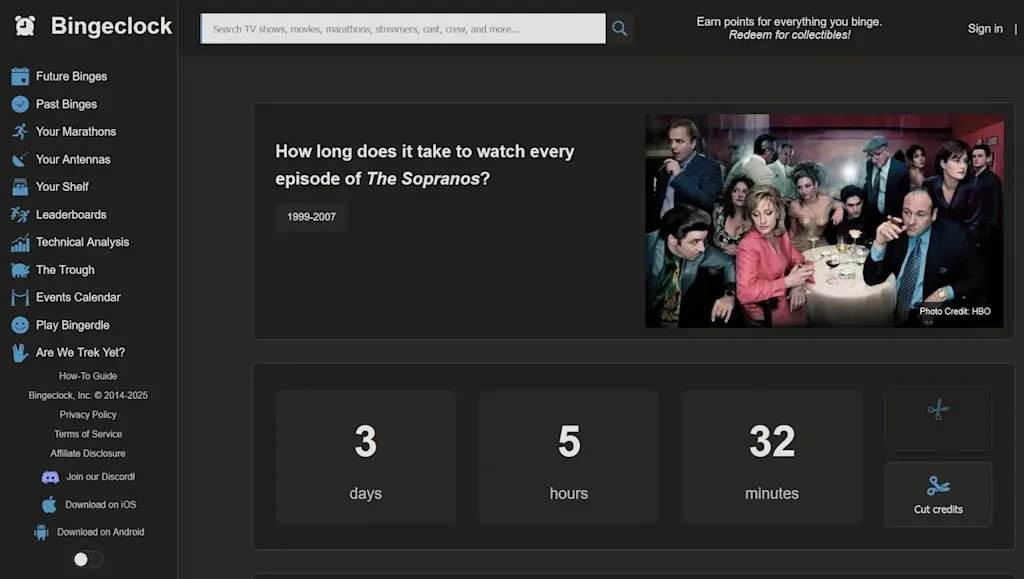
    To see how long it’ll take to get through the next show you’re streaming, check out a resource called Bingeclock​.

    ➜ Bingeclock​ is a free website that lists the total runtime of any TV series or movie.

    ⌚ Looking up a show takes just a few seconds; there’s no login or registration required.

    ✅ To find a total watch time, just type the name of the show or movie into the search box.

    Directly on the search results page, you’ll see how many days, hours, and minutes it’ll take to watch. You can also hit the “Cut credits” button to see what the watch time would be if you skipped that part of the presentation.

    Precise streaming planning is never more than a few clicks away.

    Clicking on a show title leads to a page with more options, including a handy “Daily planning” button that asks how many episodes you intend to watch per day. Choosing a number will update the watch time, showing how many days you’d need to get through the entire series.
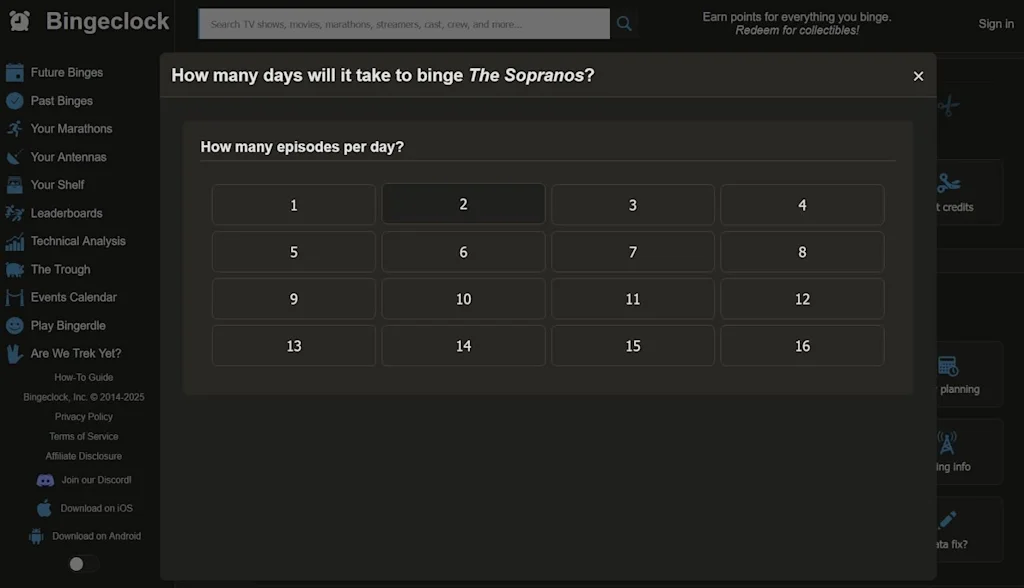
    Bingeclock lets you get incredibly nuanced with mapping out your streaming schedule.

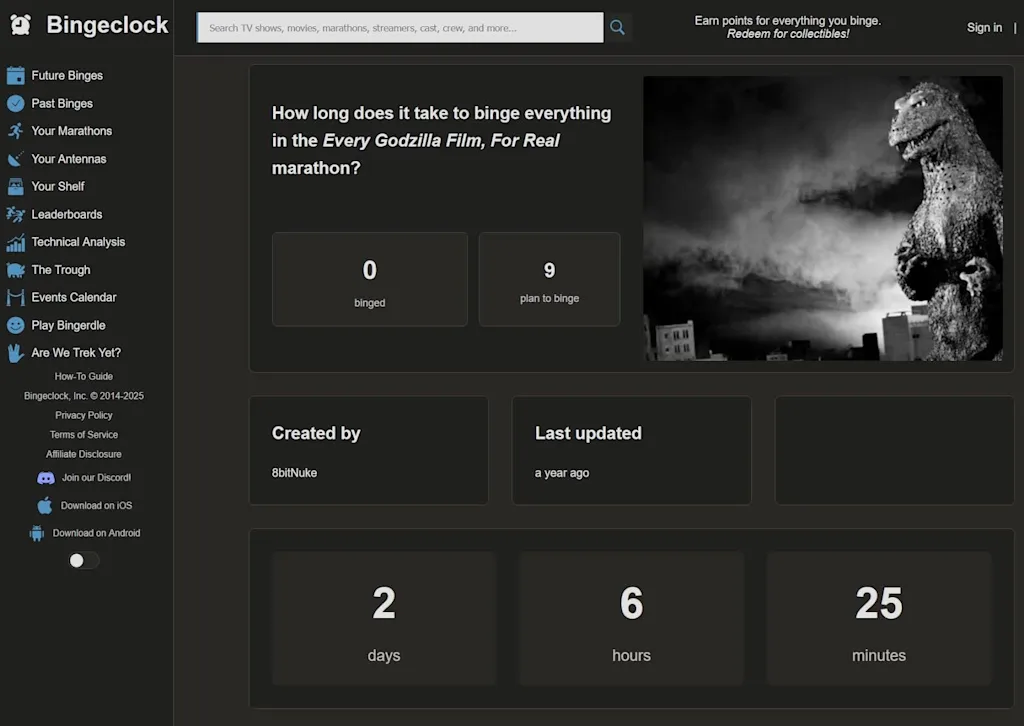
    While you don’t need an account to use Bingeclock, creating one unlocks some interesting extra features—including a watchlist, a log of your past binges, and a way to plan “Marathons” of multiple movies or TV shows. (You can also head to the “Leaderboards” tab to see popular Marathons from others, like the two-day Marathon of every Godzilla movie​.)

    Streaming marathons, in style—thanks to Bingeclock’s intelligent estimates.

    The site has a few other charming oddities. The ​Bingerdie​ game is essentially Wordle, but with terms from popular TV shows, and the Are We Trek Yet?​ subsite shows how many fictional Star Trek advancements have become reality.

    And if all this leaves you feeling even more indecisive about what to watch, just head to the “​Your Antennas​” menu. Here, you’ll be given a virtual tube TV with dozens of seemingly random streaming “channels” to flip through, from Grateful Dead concert footage and Disney theme park walkthroughs to recent robotics demos.
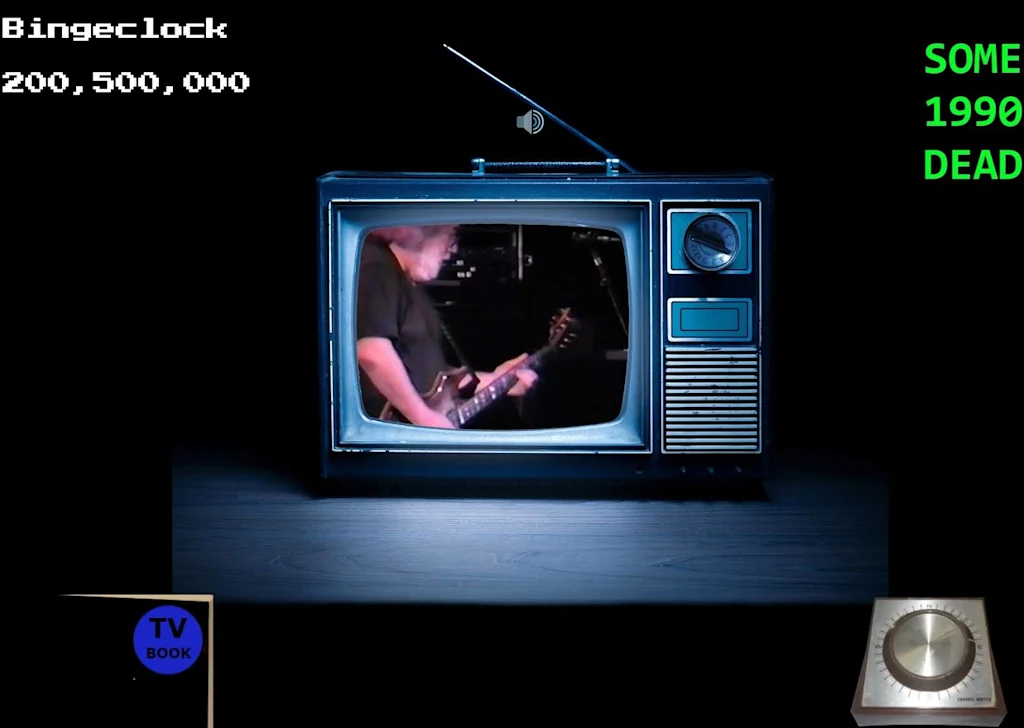
    You never know what you might find in Bingeclock’s on-demand “channels.”

    It’s nice to know that while Bingeclock can help meticulously plot your TV time, it can help you waste it as well.

    • Bingeclock is ​completely web-based​ and will work in any browser, on any device, without any downloads—though the service does also offer ​an Android app​ and a beta-level, ​TestFlight-requiring iOS app​ if you’d rather go that route.
    • It’s completely free to use without any limitations.
    • And you don’t have to provide any personal info whatsoever to use it—though if you do opt to create an account, the site’s privacy policy​ is pretty standard and straightforward about how it does and doesn’t use any associated details.

    Treat yourself to all sorts of brain-boosting goodies like this with the free Cool Tools newsletter—starting with an instant introduction to an incredible audio app that’ll tune up your days in truly delightful ways.


    Source link

    Share. Facebook Twitter Pinterest LinkedIn Tumblr Email

    Related Posts

    How to Generate 818K Impressions With Just Your Local Expertise

    October 27, 2026

    Anthropic’s 97-page list of business risks is quadruple the length of other AI IPOs. What’s on it: weapons, blackmail, and more

    October 27, 2026

    Shake Shack Founder Danny Meyer’s Best Leadership Advice

    October 27, 2026
    Top News
    Business 5 Mins Read

    How to choose between ChatGPT’s ‘chat’ and ‘work’ modes

    Business 5 Mins Read

    In the parlance of tech companies, I’m a “heavy user” of AI chatbots like ChatGPT…

    You can now fly Delta business class for a lot less, but there’s a catch

    July 9, 2026

    IBM Stock Climbs as Market Shifts

    October 2, 2026

    Subcutaneous Microchip Mandates | Armstrong Economics

    March 10, 2026
    Top Trending
    Business 7 Mins Read

    How to Generate 818K Impressions With Just Your Local Expertise

    Business 7 Mins Read

    Opinions expressed by Entrepreneur contributors are their own. Key Takeaways Your audience…

    World Politics 1 Min Read

    Week 10 High School Football: Playoff Picture Tightens Across the Map

    World Politics 1 Min Read

    Friday night lights delivered again in Week 10, with contenders in Ohio,…

    Business 3 Mins Read

    Anthropic’s 97-page list of business risks is quadruple the length of other AI IPOs. What’s on it: weapons, blackmail, and more

    Business 3 Mins Read

    In preparation for what could be the biggest initial public offering of…

    Categories
    • Business
    • Economy
    • Headline News
    • Top News
    • US Politics
    • World Politics
    About us

    The Populist Bulletin was founded with a fervent commitment to inform, inspire, empower and spark meaningful conversations about the economy, business, politics, government accountability, globalization, and the preservation of American cultural heritage.

    We are devoted to delivering straightforward, unfiltered, compelling, relatable stories that resonate with the majority of the American public, while boldly challenging false mainstream narratives that seem to only serve entrenched elitists, and foreign interests.

    Top Picks

    How to Generate 818K Impressions With Just Your Local Expertise

    October 27, 2026

    Week 10 High School Football: Playoff Picture Tightens Across the Map

    October 27, 2026

    Anthropic’s 97-page list of business risks is quadruple the length of other AI IPOs. What’s on it: weapons, blackmail, and more

    October 27, 2026
    Categories
    • Business
    • Economy
    • Headline News
    • Top News
    • US Politics
    • World Politics
    Copyright © 2025 Populist Bulletin. All Rights Reserved.

    Type above and press Enter to search. Press Esc to cancel.