
Close Menu
    Facebook X (Twitter) Instagram
    TRENDING :
    • YouTube Premium vs. YouTube Premium Lite: What’s the difference?
    • Canada Slips Into Recession | Armstrong Economics
    • The loneliness no one warns CEOs about
    • Zelensky Betrays Poland | Armstrong Economics
    • Top AI Experts Forbidden To Leave China Without Approval
    • 10 Affordable Franchises to Open Today
    • Best Growing Franchises: Top 10 to Invest
    • 10 Essential Tips for Business Expense Management
    Populist Bulletin
    • Home
    • US Politics
    • World Politics
    • Economy
    • Business
    • Headline News
    Populist Bulletin
    Home»Business»5 time-saving Google Calendar tricks you should be using
    Business 3 Mins Read

    5 time-saving Google Calendar tricks you should be using

    Business 3 Mins Read
    Share Facebook Twitter Pinterest LinkedIn Tumblr Telegram Email Copy Link
    Follow Us
    Google News Flipboard
    Share
    Facebook Twitter LinkedIn Pinterest Email


    If you’re still using Google Calendar like it’s 2009—just punching in appointments and letting it ride—you’re leaving productivity on the table.

    While we’re all drowning in digital noise, the single best thing you can do is carve out some actual, useful time. These five tricks are simple to implement, and they turn your basic calendar into a surprisingly effective time-management copilot.

    So, stop scheduling and start planning.

    The shortcut-iest shortcuts

    You know what’s less efficient than a two-hour conference call? Constantly clicking the “Create” button or dragging your mouse to the next available time slot.

    Instead, just hit the C key on your keyboard.

    The event creation box pops up instantly, ready for you to title your meeting and select a time. It’s basic, but the cumulative time savings of not having to drag the pointer to the left-hand corner of your screen for the ten-thousandth time is non-trivial.

    Also, while you’re at it, hit T to jump straight back to today’s date, and check out other useful shortcuts here.

    Block out ‘Focus Time’

    We all have a task list that never ends. You need two hours to write that report, but your calendar is a patchwork quilt of calls, reminders, and “quick syncs.” If it’s not on the calendar, it doesn’t exist.

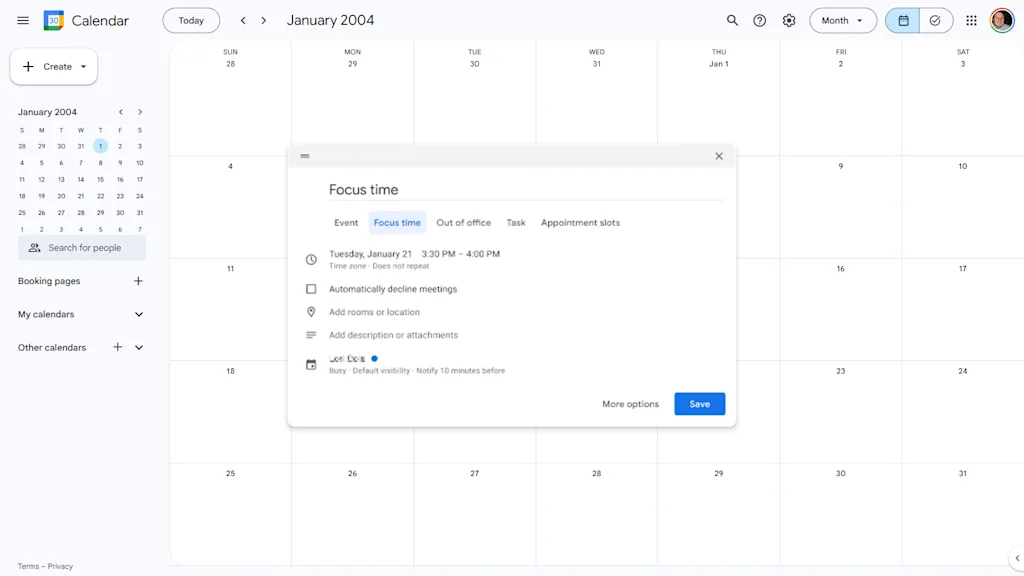
    Carve out some actual work time by scheduling a Focus Time event. Note that for this to work, you’ll need a Business, Enterprise, Education, or Nonprofit Google Workspace account.

    In the past, you’d just block off the time. Now, Google Calendar has a specific Focus Time event type. It’s like a regular event, but it gives you an option to automatically decline any conflicting invitations during that block.

    Use it, abuse it, and get something done.

    Color-code your events

    Your work calendar is a mess of identical blue events. Is that blue dot a mandatory team meeting, or just a reminder to take the recycling out? You have to click it to know.

    Instead, assign a color to specific types of events.
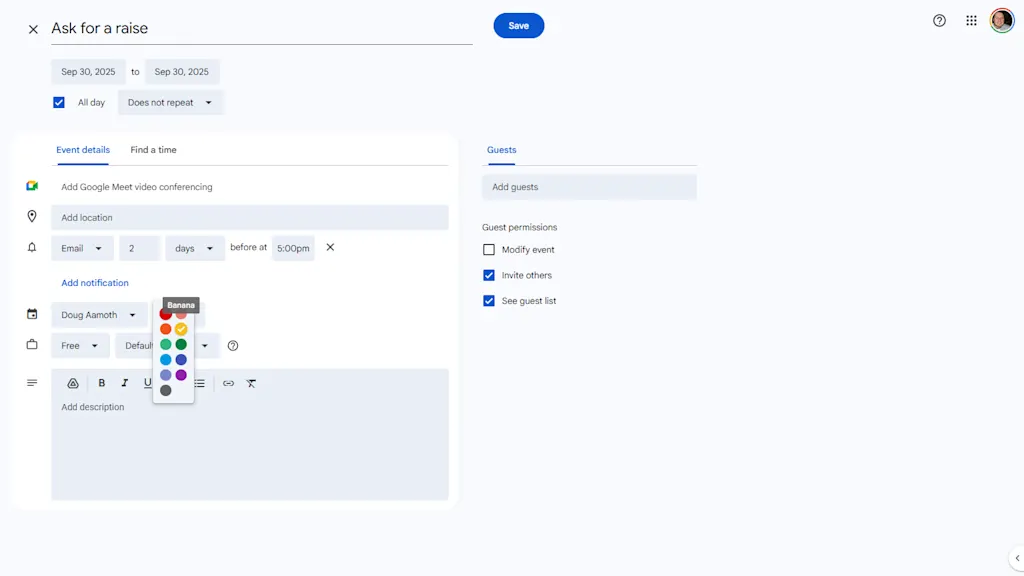
    When editing an event, change its color next to your name about half-way down the modal. I like to use red for anything that’s a “Hard Stop” or external meeting, green for personal stuff, and yellow for internal work things.

    Now, when you glance at your week, you can instantly see the type of week you’re having: a color-coded visual indicator of your commitments.

    Schedule meetings without herding cats

    Let’s be honest: The absolute worst part of scheduling a meeting isn’t the meeting itself, it’s the five emails and three Slack messages that happen before the meeting, all dedicated to the question, “When are you free?”

    You’re not a reservation agent. Use the “Find a Time” feature instead.
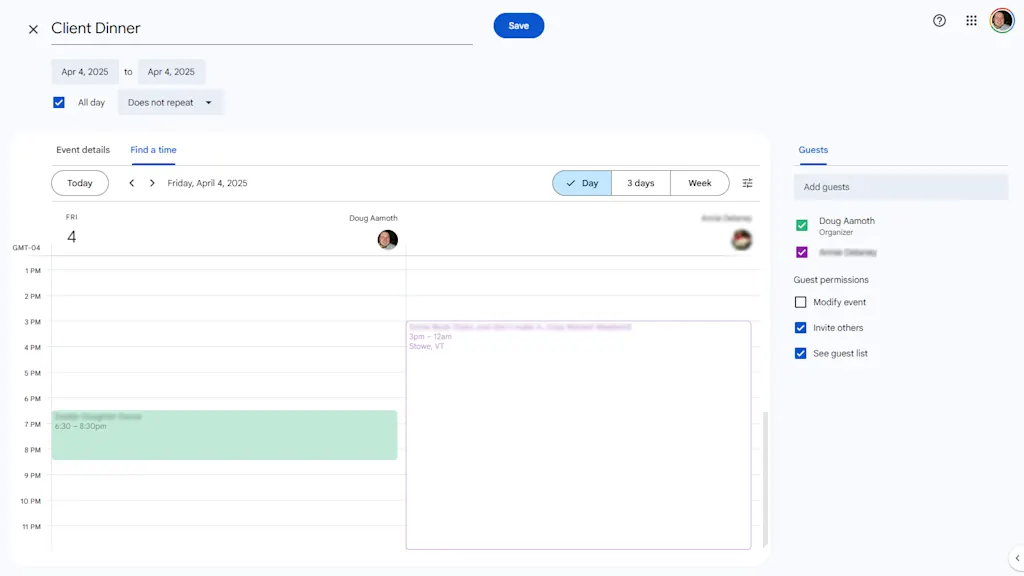
    When you create an event and add your guests, click on the “Find a Time” tab right next to “Event Details.”

    Google Calendar instantly overlays the schedules of everyone you invited, so you can see exactly who is busy and who is free and at which times. Drag the event block to the first open slot that works for everyone.

    Build in some breaks

    The bane of modern office life is an entire day of back-to-back, 30-minute meetings. No time for lunch. No time for the bathroom. No time for . . . well, anything.

    Don’t be a time miser. Instead, go to Settings > General > Event settings > Default Duration and click the “Speed meetings” box.
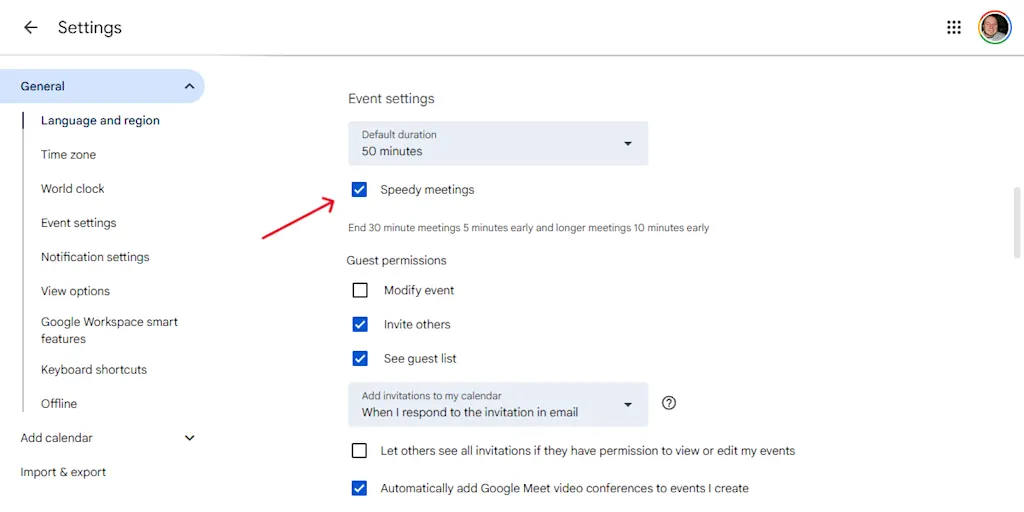
    This is a subtle but powerful change. Now, when you create an event, it automatically stops five or ten minutes before the hour.

    You and your attendees get a break and a chance to prep for the next call. In a world insane with meetings, it’s a small victory for sanity.


    Source link

    Share. Facebook Twitter Pinterest LinkedIn Tumblr Email

    Related Posts

    YouTube Premium vs. YouTube Premium Lite: What’s the difference?

    June 1, 2026

    The loneliness no one warns CEOs about

    June 1, 2026

    10 Affordable Franchises to Open Today

    June 1, 2026
    Top News
    Business 7 Mins Read

    Top 5 Online Payroll Software Solutions for Small Businesses

    Business 7 Mins Read

    When managing payroll for your small business, choosing the right online software can streamline your…

    Liberty & The Passage Of Time

    September 29, 2025

    A New History of the Americas, Part 2, With Greg Grandin

    September 23, 2025

    Amazon might owe you money: $1.5 billion payout for Prime members follows FTC settlement. Here’s what to know

    September 26, 2025
    Top Trending
    Business 4 Mins Read

    YouTube Premium vs. YouTube Premium Lite: What’s the difference?

    Business 4 Mins Read

    When people talk about the “enshittification” trend—in which companies make their free…

    Economy 3 Mins Read

    Canada Slips Into Recession | Armstrong Economics

    Economy 3 Mins Read

    Statistics Canada reported that Canadian GDP contracted by 0.1% in the first…

    Business 7 Mins Read

    The loneliness no one warns CEOs about

    Business 7 Mins Read

    Not long ago, I spoke with a newly appointed CEO who looked…

    Categories
    • Business
    • Economy
    • Headline News
    • Top News
    • US Politics
    • World Politics
    About us

    The Populist Bulletin was founded with a fervent commitment to inform, inspire, empower and spark meaningful conversations about the economy, business, politics, government accountability, globalization, and the preservation of American cultural heritage.

    We are devoted to delivering straightforward, unfiltered, compelling, relatable stories that resonate with the majority of the American public, while boldly challenging false mainstream narratives that seem to only serve entrenched elitists, and foreign interests.

    Top Picks

    YouTube Premium vs. YouTube Premium Lite: What’s the difference?

    June 1, 2026

    Canada Slips Into Recession | Armstrong Economics

    June 1, 2026

    The loneliness no one warns CEOs about

    June 1, 2026
    Categories
    • Business
    • Economy
    • Headline News
    • Top News
    • US Politics
    • World Politics
    Copyright © 2025 Populist Bulletin. All Rights Reserved.

    Type above and press Enter to search. Press Esc to cancel.